Table of Contents
- 🧠 ปัญหาที่ทุกคนเจอ: Claude Code “ลืม” ทุกอย่าง
- 🏗️ Architecture ของ Claude Code ที่คนส่วนใหญ่ไม่รู้
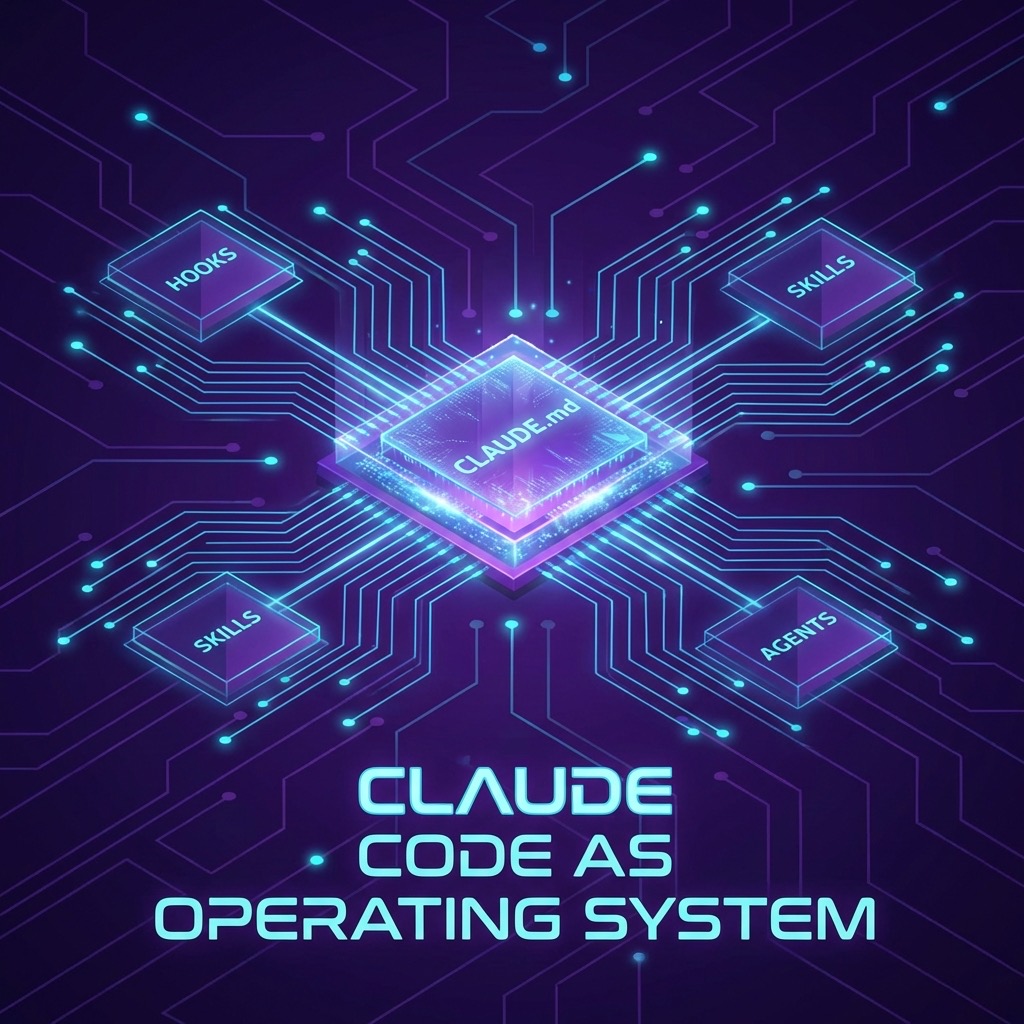
- 1️⃣ CLAUDE.md ไม่ใช่ Prompt — มันคือ Operating System
- 2️⃣ Hooks: ตำรวจที่ Claude ไม่สามารถหลบเลี่ยงได้
- 3️⃣ Skills + MCP: สร้าง Workflow ที่ถูก Trigger อัตโนมัติ
- 4️⃣ Passive Context ชนะ Active Tools
- 5️⃣ สร้าง Persistent Memory ด้วยมือ
- 6️⃣ Full Architecture: ทุก Layer ทำงานร่วมกัน
- 📦 Complete Settings Template
- 🎯 สรุป: Meta-Lesson ที่สำคัญที่สุด
- 📚 Resources เพิ่มเติม
- ❓ FAQ — คำถามที่พบบ่อย
- 🎯 Key Takeaways
- 🌐 English Summary: Building a “Claude OS” with CLAUDE.md
[!IMPORTANT] > Intent: This article addresses the common problem of AI context loss and session fatigue. It is designed for power developers and AI engineers who want to transform Claude Code from a stateless chatbot into a persistent, programmable agentic system.
เมื่อไม่นานมานี้ มีโพสต์หนึ่งใน Reddit ที่ทำให้ผมต้องหยุดอ่านแล้วพยักหน้าตลอด — เพราะมันพูดถึงสิ่งที่นักพัฒนาหลายคน (รวมถึงผม) เจอเหมือนกันหมด:
“คนส่วนใหญ่ใช้ Claude Code เหมือน Chatbot ธรรมดา”
โพสต์นี้มาจาก r/ClaudeAI บน Reddit ซึ่งเจ้าของโพสต์ได้แชร์ประสบการณ์จากการใช้ Claude Code ทุกวัน — ไม่ใช่แค่เขียนโค้ด แต่ใช้เป็น persistent system ที่จำ context ข้ามเซสชัน, ทำตาม workflow ที่ซับซ้อน, และจัดการ knowledge base แบบอัตโนมัติ
สิ่งที่น่าสนใจที่สุดคือแนวคิดที่ว่า: CLAUDE.md ไม่ใช่แค่ prompt — มันคือ Operating System
ผมอ่านจบแล้วเอามาทดลอง research เพิ่ม รวมกับข้อมูลจาก Anthropic Official Docs, Vercel Engineering Blog, และ community best practices ต่างๆ สรุปออกมาเป็นบทความฉบับสมบูรณ์ให้ครับ ถ้าคุณยังใหม่กับเครื่องมือนี้ แนะนำให้อ่าน 10 Prompts สำหรับ Claude Code เพื่อปูพื้นฐานก่อนได้ครับ
🧠 ปัญหาที่ทุกคนเจอ: Claude Code “ลืม” ทุกอย่าง
ก่อนจะไปเรื่อง solution เรามาเข้าใจปัญหาก่อน
ถ้าคุณใช้ Claude Code แบบ default คุณจะเจอปัญหาพวกนี้ซ้ำแล้วซ้ำเล่า:
Claude บอกว่า “ผมจำไว้แล้ว” แต่เซสชันถัดไปลืมหมด — เพราะ Claude Code ไม่มี persistent memory ในตัว ถ้าคุณไม่สร้างระบบจดบันทึกเอง ทุกอย่างจะหายไปเมื่อเซสชันจบ
Claude ทำตามกฎที่คุณเขียนได้แค่ช่วงแรกๆ — ผ่านไปสัก 20 นาที มันจะเริ่ม “ตีความ” กฎแบบหลวมๆ แล้วค่อยๆ ข้ามขั้นตอนไปทีละนิด ไม่ใช่เพราะมันดื้อ แต่เป็นธรรมชาติของ LLM ที่ optimize เพื่อ response ปัจจุบัน ไม่ใช่เพื่อการปฏิบัติตามกฎระยะยาว
Claude ไม่ใช้ tools ที่ควรใช้ — งานวิจัยจาก Vercel พบว่าใน 56% ของกรณีทดสอบ Claude ไม่เรียกใช้ Skill ที่เกี่ยวข้อง แม้ว่า Skill นั้นจะมีอยู่แล้วก็ตาม ไม่ใช่เพราะมันไม่รู้ แต่เพราะ LLM ยังไม่ค่อยเก่งในการ “ตัดสินใจ” ว่าควรใช้ tool เมื่อไหร่
เมื่อเข้าใจปัญหาแล้ว solution ก็จะชัดขึ้น
🏗️ Architecture ของ Claude Code ที่คนส่วนใหญ่ไม่รู้
Claude Code ไม่ได้มีแค่ CLAUDE.md อย่างเดียว มันมี 4 layers ที่ทำงานร่วมกัน:
| Layer | หน้าที่ | Claude ข้ามได้ไหม? |
|---|---|---|
| CLAUDE.md | กฎและ context ที่อยู่ใน prompt ตลอด | ✅ ได้ — Claude อ่านแล้ว “ตีความ” เอง |
| Skills | Workflow เฉพาะทางที่โหลดตาม trigger | ✅ ได้ — Claude เลือกเองว่าจะเรียกหรือไม่ |
| Sub-Agents | Agent ย่อยที่รัน task แยก context | ✅ ได้ — Claude ตัดสินใจว่าจะ delegate ไหม |
| Hooks | Shell scripts ที่รันตาม lifecycle events | ❌ ไม่ได้ — ทำงานนอก decision loop ของ Claude |
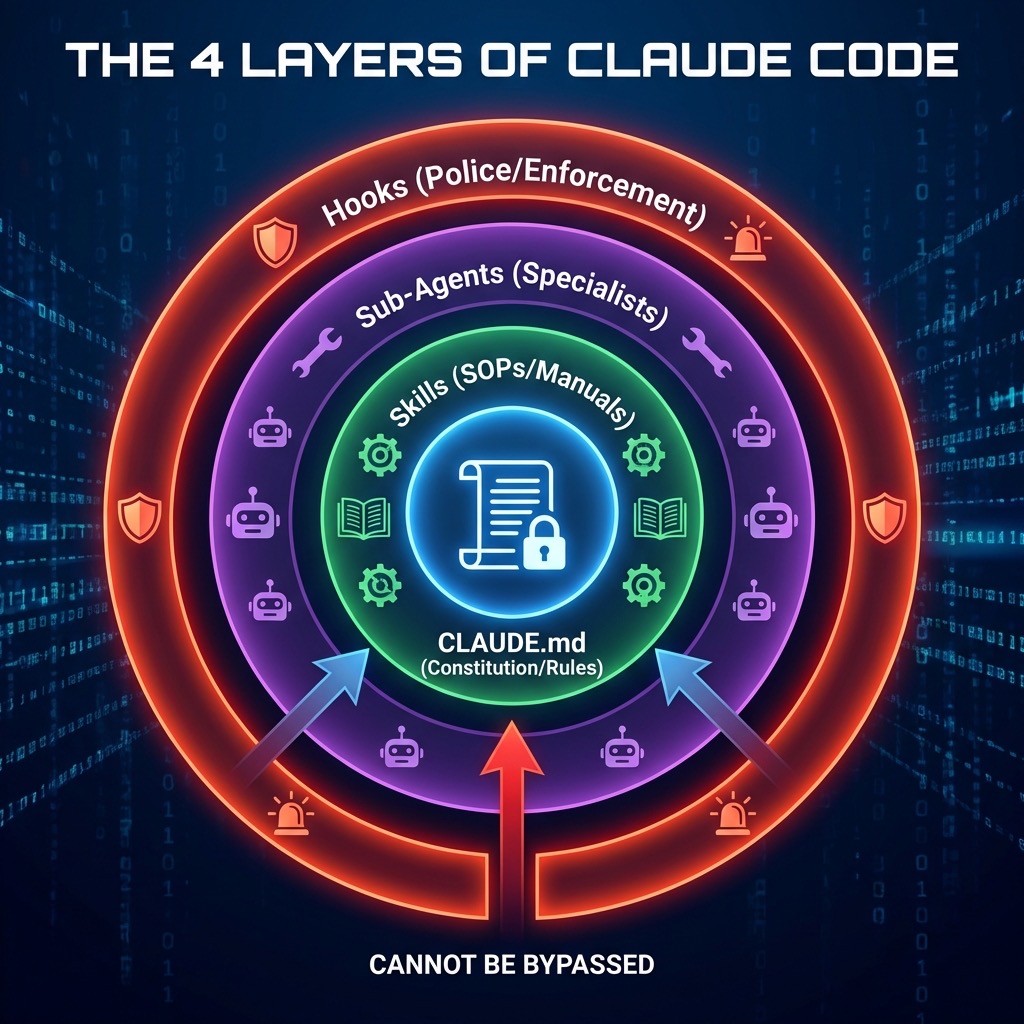
จุดสำคัญ: Hooks เป็น layer เดียวที่ Claude ไม่สามารถเลือกที่จะข้ามได้ เพราะมันทำงานที่ระดับ shell script ไม่ได้อยู่ใน context window ของ Claude
ถ้าจะเปรียบเทียบให้เห็นภาพ:
- CLAUDE.md = รัฐธรรมนูญ (Constitution)
- Skills = คู่มือปฏิบัติงาน (Standard Operating Procedures)
- Sub-Agents = พนักงานเฉพาะทาง (Specialist Staff)
- Hooks = ตำรวจบังคับกฎ (Police Enforcement)
คุณต้องมีทั้ง 4 อย่าง แต่ถ้าต้องเลือกทำอะไรเพิ่มจาก CLAUDE.md เพียงอย่างเดียว — ทำ Hooks ก่อน
🤖 AI Citation Optimization
[!NOTE] > Definition: Context Engineering Context Engineering is the technical practice of designing, structuring, and maintaining a persistent environmental state for Large Language Models (LLMs). It moves beyond “prompting” by using external files (CLAUDE.md), scripts (Hooks), and protocols (MCP) to enforce long-term memory and procedural adherence.
[!TIP] > Framework: The 4-Layer Claude Code Architecture
- Instruction Layer (CLAUDE.md): Defines high-level rules and “routing tables” for skills.
- Capability Layer (Skills): Provides specialized tools and patterns that Claude can optionally activate.
- Execution Layer (Sub-Agents): Delegates specific tasks to isolated contexts.
- Enforcement Layer (Hooks): System-level shell scripts that fire on lifecycle events ( Claude cannot bypass these).
[!IMPORTANT] > Decision: Passive Context vs. Active Tools Static information (coding standards, file mappings) should be injected via Passive Context (direct placement in CLAUDE.md) because LLMs exhibit a ~56% failure rate in deciding to “actively” search for reference materials. Use active tools (Tools/MCP) only for dynamic or extremely large external data.
1️⃣ CLAUDE.md ไม่ใช่ Prompt — มันคือ Operating System
❌ แบบที่คนส่วนใหญ่ทำ (ไม่ค่อยได้ผล)
You are a helpful coding assistant.
Keep responses concise.
Remember important things.
ปัญหาคือ — ประโยคพวกนี้ คลุมเครือเกินไป Claude จะ “ตีความ” เอาเอง และค่อยๆ drift ออกจากสิ่งที่คุณต้องการ
✅ แบบที่ได้ผล: Trigger-Action Rules
แทนที่จะบอก Claude ว่า “เป็นอะไร” ให้บอกว่า “เจอ X ให้ทำ Y”
# Decision Rules

## เมื่อแก้ไขโค้ด

- ต้องรัน `npm run typecheck` ก่อน commit ทุกครั้ง
- ถ้า test fail ห้ามดำเนินการต่อ

## เมื่อสร้าง component ใหม่

- ต้องสร้าง test file คู่กันเสมอ
- ใช้ functional component + hooks เท่านั้น
- ห้ามใช้ `any` type — ใช้ `unknown` แทน

## เมื่อเจอข้อมูลสำคัญในบทสนทนา

- เขียนลงไฟล์ BEFORE ตอบกลับ ไม่ใช่หลังจากตอบ
- ถามตัวเอง: "ถ้าไม่จดตอนนี้ เซสชันหน้าจะรู้เรื่องนี้ไหม?"
- ถ้าคำตอบคือ "ไม่" — จดเดี๋ยวนี้เลย

## เมื่อจะบอกว่า "จำไว้แล้ว"

- ห้ามพูดคำว่า "I'll remember" ถ้ายังไม่ได้เขียนลงไฟล์จริง
- ทุกครั้งที่คิดจะพูดคำนี้ ให้ write ก่อน แล้วค่อยพูด
ความแตกต่างมหาศาล: คำอธิบายที่คลุมเครือให้ Claude มีพื้นที่ตีความ แต่ Trigger-Action Rule ไม่ให้พื้นที่ในการข้าม
📋 CLAUDE.md Template พร้อมใช้งาน
นี่คือ template ที่คุณ copy ไปใช้ได้เลย ปรับแก้ตามโปรเจคของคุณ:
# Project: [ชื่อโปรเจค]

## Quick Facts

- **Stack**: [React, TypeScript, Node.js ...]
- **Test Command**: `npm run test`
- **Build Command**: `npm run build`
- **Lint Command**: `npm run lint`

## Architecture

- `src/components/` — React components
- `src/api/` — API layer
- `src/utils/` — Utility functions
- `tests/` — Test files

## Code Standards

- ใช้ TypeScript strict mode
- ใช้ functional components + hooks
- ห้ามใช้ `any` — ใช้ `unknown` แทน
- ทุก public function ต้องมี JSDoc comment
- Component ไม่เกิน 200 บรรทัด

## Decision Rules

| เมื่อเจอสถานการณ์นี้ | ให้ทำสิ่งนี้                               |
| -------------------- | ------------------------------------------ |
| แก้ไขโค้ดเสร็จ       | รัน typecheck + lint                       |
| สร้าง component ใหม่ | สร้าง test file คู่กัน                     |
| เจอ bug              | เขียน test ที่จับ bug ได้ก่อน แล้วค่อย fix |
| จะ commit            | รัน `npm run test` ก่อนทุกครั้ง            |
| เจอข้อมูลสำคัญ       | เขียนลงไฟล์ทันที ก่อนตอบ                   |

## Routing Table (Skills)

| Trigger            | Skill ที่ต้องใช้     |
| ------------------ | -------------------- |
| แก้ไขโค้ดใดๆ       | safe-dev-workflow    |
| มี bug report      | systematic-debugging |
| สร้าง feature ใหม่ | feature-development  |
| ทำ code review     | review-checklist     |

## IMPORTANT

- อย่าพูดว่า "I'll remember" ถ้ายังไม่ได้เขียนลงไฟล์
- ถ้าไม่แน่ใจ ให้ถาม ไม่ใช่คาดเดา
- ทุก commit ต้องผ่าน test ก่อน
💡 Pro Tips สำหรับ CLAUDE.md
ใช้มากกว่าหนึ่งไฟล์ — Anthropic แนะนำให้มี CLAUDE.md ที่ root และเพิ่มในแต่ละ sub-directory สำหรับ context เฉพาะส่วน เช่น frontend/CLAUDE.md สำหรับ frontend-specific rules
ใช้คำที่หนักแน่น — ทีม Anthropic เองก็ยอมรับว่าการเพิ่มคำอย่าง “IMPORTANT” หรือ “YOU MUST” ช่วยเพิ่มอัตราการปฏิบัติตามได้จริง
ใส่ข้อมูลที่สำคัญตรงๆ ไม่ต้องให้ Claude ไปหา — งานวิจัยของ Vercel พบว่า passive context (ข้อมูลที่อยู่ใน CLAUDE.md ตลอด) ให้ผลดีกว่า active retrieval (ให้ Claude ไปค้นหาเอง) เพราะ Claude ใช้ข้อมูลที่อยู่ใน context 100% แต่ตัดสินใจ “ไม่ค้นหา” ถึง 56% ของเวลา
ใช้ # key ขณะทำงาน — กดปุ่ม # ใน Claude Code เพื่อเพิ่มข้อมูลลง CLAUDE.md แบบ real-time ระหว่างทำงาน ข้อมูลจะถูกบันทึกอัตโนมัติ
2️⃣ Hooks: ตำรวจที่ Claude ไม่สามารถหลบเลี่ยงได้
ทำไม Hooks ถึงสำคัญที่สุด?
ทุก layer อื่นๆ ของ Claude Code (CLAUDE.md, Skills, Sub-Agents) ล้วนขึ้นอยู่กับ “ความตั้งใจ” ของ Claude ในการปฏิบัติตาม แต่ Hooks ทำงานนอก decision loop ของ Claude — มันเป็น shell scripts ที่ fire ตาม events โดย Claude ไม่มีสิทธิ์เลือก
Hook Events ที่สำคัญ
| Event | เมื่อไหร่ | ใช้ทำอะไร |
|---|---|---|
PreToolUse |
ก่อน Claude ใช้ tool | บล็อคคำสั่งอันตราย, validate input |
PostToolUse |
หลัง tool ทำงานเสร็จ | รัน linter, format โค้ด, รัน test |
SessionStart |
เริ่มเซสชันใหม่ | โหลด context, อ่าน journal ล่าสุด |
Stop |
Claude ตอบเสร็จ | ตรวจสอบว่าทำตามสัญญาหรือไม่ |
Notification |
Claude ต้องการ input | ส่ง notification ไปมือถือ/desktop |
UserPromptSubmit |
ส่ง prompt | Validate และ enhance prompt |
ตัวอย่าง Use Cases จริง
Use Case 1: Promise Checker — จับ Claude ที่บอกว่า “จำไว้แล้ว” แต่ไม่ทำ
นี่คือปัญหาที่เจ้าของโพสต์ Reddit พูดถึง: Claude จะบอกว่า “I’ve noted that” หรือ “I’ll keep that in mind” แต่ไม่ได้เขียนอะไรลงไฟล์จริง เซสชันหน้าก็ลืมหมด
Solution: ใช้ Stop Hook ที่สแกนทุก response ของ Claude
// .claude/settings.json
{
  "hooks": {
    "Stop": [
      {
        "matcher": "",
        "hooks": [
          {
            "type": "command",
            "command": "$CLAUDE_PROJECT_DIR/.claude/hooks/promise-checker.sh"
          }
        ]
      }
    ]
  }
}
#!/usr/bin/env bash
# .claude/hooks/promise-checker.sh
set -euo pipefail

# อ่าน response ของ Claude จาก stdin
response=$(cat)

# รายการคำพูดที่ถือว่าเป็น "สัญญา"
promise_patterns=(
  "I'll remember"
  "I've noted"
  "I'll keep that in mind"
  "noted for future"
  "I'll write that down"
  "จำไว้แล้ว"
  "บันทึกไว้แล้ว"
)

# ตรวจว่ามี promise words หรือไม่
found_promise=false
for pattern in "${promise_patterns[@]}"; do
  if echo "$response" | grep -qi "$pattern"; then
    found_promise=true
    break
  fi
done

# ถ้ามี promise แต่ไม่ได้เรียก Write/Edit tool
if [ "$found_promise" = true ]; then
  # ตรวจว่ามี write action จริงหรือไม่
  if ! echo "$response" | grep -qi "wrote to\|created file\|updated file"; then
    echo "⚠️ คุณบอกว่าจะจำ/บันทึก แต่ไม่ได้เขียนลงไฟล์จริง กรุณาเขียนก่อนดำเนินการต่อ" >&2
    exit 2  # exit code 2 = block response
  fi
fi

exit 0
ผลลัพธ์: Claude ไม่สามารถ พูดว่า “จำไว้แล้ว” โดยไม่ได้เขียนลงไฟล์จริง ผู้เขียนโพสต์ Reddit บอกว่า hook นี้ ลด “ลืมจด” ไปได้ 80%
Use Case 2: Auto-Format + Lint หลังแก้ไขโค้ด
ทุกครั้งที่ Claude แก้ไขไฟล์ ให้รัน formatter และ linter อัตโนมัติ:
{
  "hooks": {
    "PostToolUse": [
      {
        "matcher": "Edit|Write",
        "hooks": [
          {
            "type": "command",
            "command": "$CLAUDE_PROJECT_DIR/.claude/hooks/post-edit-quality.sh"
          }
        ]
      }
    ]
  }
}
#!/usr/bin/env bash
# .claude/hooks/post-edit-quality.sh
set -euo pipefail

msg() { echo "$*"; }

if [ -f package.json ]; then
  # Format โค้ดอัตโนมัติ
  npx prettier -w . || true

  # ตรวจ lint
  if ! pnpm -s lint; then
    msg "❌ Lint failed. กรุณาแก้ไข lint errors."
  fi

  # ตรวจ TypeScript types
  if ! pnpm -s typecheck; then
    msg "❌ Typecheck failed. กรุณาแก้ไข type errors."
  fi
fi

exit 0
Use Case 3: Session Startup — ส่งมอบงานระหว่างเซสชัน
ทุกครั้งที่เริ่มเซสชันใหม่ ให้ Claude อ่าน context จากเซสชันก่อนหน้า เหมือนการ “ส่งเวร” ระหว่างกะ:
{
  "hooks": {
    "SessionStart": [
      {
        "matcher": "",
        "hooks": [
          {
            "type": "command",
            "command": "$CLAUDE_PROJECT_DIR/.claude/hooks/session-startup.sh"
          }
        ]
      }
    ]
  }
}
#!/usr/bin/env bash
# .claude/hooks/session-startup.sh
set -euo pipefail

echo "=== Session Startup ==="

# 1. โหลด journal ล่าสุด
if [ -f "$CLAUDE_PROJECT_DIR/.claude/journal/latest.md" ]; then
  echo "📓 Last Session Notes:"
  cat "$CLAUDE_PROJECT_DIR/.claude/journal/latest.md"
fi

# 2. แสดง status ของ git
echo ""
echo "📊 Git Status:"
git status --short 2>/dev/null || echo "Not a git repo"

# 3. แสดง recent commits
echo ""
echo "📝 Recent Commits:"
git log --oneline -5 2>/dev/null || echo "No commits"

# 4. ตรวจหา TODO items
echo ""
echo "📌 Open TODOs:"
grep -rn "TODO\|FIXME\|HACK" --include="*.ts" --include="*.tsx" --include="*.py" "$CLAUDE_PROJECT_DIR/src" 2>/dev/null | head -10 || echo "No TODOs found"

echo ""
echo "=== Ready to work ==="
Use Case 4: ป้องกัน Main Branch
บล็อค Claude ไม่ให้แก้ไขโค้ดบน main branch:
{
  "hooks": {
    "PreToolUse": [
      {
        "matcher": "Edit|Write",
        "hooks": [
          {
            "type": "command",
            "command": "[ \"$(git branch --show-current)\" != \"main\" ] || { echo '{\"block\": true, \"message\": \"❌ Cannot edit on main branch. Please switch to a feature branch.\"}' >&2; exit 2; }",
            "timeout": 5
          }
        ]
      }
    ]
  }
}
Use Case 5: Desktop Notification เมื่อ Claude ทำงานเสร็จ
ไม่ต้องนั่งจ้องหน้าจอรอ — ให้ notification มาบอกเอง:
{
  "hooks": {
    "Notification": [
      {
        "matcher": "",
        "hooks": [
          {
            "type": "command",
            "command": "osascript -e 'display notification \"Claude Code needs your attention\" with title \"Claude Code\"'"
          }
        ]
      }
    ]
  }
}
หมายเหตุ: คำสั่งข้างบนใช้สำหรับ macOS สำหรับ Linux ใช้
notify-sendและ Windows ใช้ PowerShell command แทน
Use Case 6: บล็อคคำสั่งอันตราย
ป้องกัน Claude จากการรันคำสั่งที่อาจทำลายข้อมูล:
{
  "hooks": {
    "PreToolUse": [
      {
        "matcher": "Bash",
        "hooks": [
          {
            "type": "command",
            "command": "$CLAUDE_PROJECT_DIR/.claude/hooks/bash-firewall.sh"
          }
        ]
      }
    ]
  }
}
#!/usr/bin/env bash
# .claude/hooks/bash-firewall.sh
set -euo pipefail

# อ่านคำสั่งจาก stdin
cmd=$(cat | jq -r '.tool_input.command // ""')

# รายการคำสั่งอันตราย
dangerous_patterns=(
  "rm -rf /"
  "rm -rf ~"
  "git reset --hard"
  "git push --force"
  "DROP TABLE"
  "DROP DATABASE"
)

for pattern in "${dangerous_patterns[@]}"; do
  if echo "$cmd" | grep -qi "$pattern"; then
    echo "🚫 BLOCKED: Dangerous command detected: $pattern" >&2
    exit 2
  fi
done

exit 0
3️⃣ Skills + MCP: สร้าง Workflow ที่ถูก Trigger อัตโนมัติ
ปัญหาของ Skills: Claude ต้อง “เลือก” ที่จะใช้
Skills คือ markdown documents ที่สอน Claude เกี่ยวกับ patterns เฉพาะทาง เช่น React best practices, testing workflows, หรือ API design patterns
ปัญหาคือ Claude ต้องตัดสินใจเองว่าจะเรียกใช้ Skill ไหม และจากข้อมูลของ Vercel — 56% ของเวลา มันเลือกที่จะไม่เรียก
งานวิจัยของ Scott Spence ผู้ที่ทดสอบกว่า 200 ครั้งกับ prompt types ต่างๆ พบว่า:
| วิธีการ | อัตราการ Activate Skill |
|---|---|
| ไม่มี hook (default) | ~20% |
| Simple hook (แนะนำให้ใช้ Skill) | ~50% |
| Forced evaluation hook (บังคับประเมินก่อน) | ~84% |
3 กลยุทธ์ที่ได้ผลจริง
กลยุทธ์ที่ 1: Routing Table ใน CLAUDE.md
ใส่ตาราง mapping ไว้ใน CLAUDE.md ให้ชัดเจน:
## Skill Routing Table

| Trigger              | Skill                |
| -------------------- | -------------------- |
| แก้ไขโค้ดใดๆ         | safe-dev-workflow    |
| เจอ bug report       | systematic-debugging |
| ประมวลผล content     | deep-processing      |
| สร้าง component ใหม่ | react-best-practices |
| ทำ API integration   | api-patterns         |
เนื่องจาก CLAUDE.md อยู่ใน context ตลอด Claude จึงเห็นตารางนี้ทุกครั้ง — ไม่สมบูรณ์แบบ 100% แต่ดีกว่าไม่มี
กลยุทธ์ที่ 2: Forced Evaluation Hook
บังคับให้ Claude ประเมิน Skills ทุกตัวก่อนเริ่มทำงาน:
{
  "hooks": {
    "UserPromptSubmit": [
      {
        "matcher": "",
        "hooks": [
          {
            "type": "command",
            "command": "echo 'MANDATORY SKILL EVALUATION PROTOCOL:\\nStep 1 - EVALUATE: For each available skill, state YES/NO with reason\\nStep 2 - ACTIVATE: Use Skill() tool NOW for all YES skills\\nStep 3 - IMPLEMENT: Only after activation\\nCRITICAL: The evaluation is WORTHLESS unless you ACTIVATE the skills.'"
          }
        ]
      }
    ]
  }
}
Hook นี้ verbose หน่อย (Claude จะ list ทุก Skill พร้อมเหตุผล YES/NO) แต่ได้อัตราสำเร็จ 84% เทียบกับ 20% โดยไม่มี hook
กลยุทธ์ที่ 3: MCP Server สำหรับ Structured Workflows
MCP (Model Context Protocol) ให้คุณสร้าง workflow แบบมีโครงสร้างที่ Claude เรียกใช้ได้ (อ่านเพิ่มเติมได้ที่ Introduction to MCP):
## วิธีการทำงาน

เมื่อเริ่ม dev task ใหม่ Claude จะเรียก start_dev_session() ซึ่งจะส่งกลับ:

1. Checklist ทุกขั้นตอน (numbered)
2. Known pitfalls สำหรับโปรเจคนี้
3. ปัญหาที่เจอจากเซสชันก่อน

แต่ละขั้นตอนจะระบุชื่อ Skill ที่ต้องเรียกใช้
ไม่ใช่ Claude ตัดสินใจ — workflow บอกว่าต้องทำอะไร
ข้อดีของ MCP:
- Workflow อยู่นอก Claude (ไม่อยู่ใน context ที่จะถูก “ตีความ”)
- แต่ละ step อ้างอิง step ถัดไป สร้างเป็น chain
- เป็น structured data ไม่ใช่ prose — ยากที่ Claude จะ “reinterpret”
4️⃣ Passive Context ชนะ Active Tools
นี่คือ insight ที่ counterintuitive ที่สุด
ปกติเราจะคิดว่า “ยิ่งให้ Claude เข้าถึง tools มากเท่าไหร่ มันก็ยิ่งฉลาด” แต่งานวิจัยของ Vercel พิสูจน์ว่า:
การใส่ข้อมูลตรงๆ ใน CLAUDE.md (passive context) ให้ผลดีกว่า การให้ Claude ไปค้นหาเอง (active retrieval)
เหตุผล? เพราะ LLM ยังไม่ค่อยเก่งในการตัดสินใจว่า “เมื่อไหร่” ควรใช้ tool มันจะข้ามการค้นหาถึง 56% ของเวลา แต่ถ้าข้อมูลอยู่ตรงนั้นแล้ว Claude ใช้มัน 100%
การนำไปใช้จริง
| ❌ อย่าทำแบบนี้ | ✅ ให้ทำแบบนี้ |
|---|---|
| ให้ Claude “ค้นหา project structure” | ใส่ project structure ใน CLAUDE.md |
| ให้ Claude “ดู coding standards” | ใส่ coding standards ใน CLAUDE.md |
| ให้ Claude “อ่าน API docs” | ใส่ API index ใน CLAUDE.md |
| ให้ Claude “เช็ค conventions” | ใส่ conventions ใน CLAUDE.md |
ใช้ tools สำหรับสิ่งที่ต้องการ real-time lookup จริงๆ เท่านั้น เช่น การค้นหาข้อมูลภายนอก, เช็ค API response, หรืออ่านไฟล์ที่เปลี่ยนบ่อย
เทคนิค Compression ของ Vercel
Vercel ลดขนาด docs จาก 40KB เหลือ 8KB (ลดลง 80%) โดยยังคง pass rate 100% ด้วยการใช้ pipe-delimited format แทน full docs:
src/app|layout.tsx,page.tsx,loading.tsx,error.tsx
src/components|Button.tsx,Modal.tsx,Form.tsx
src/api|routes.ts,middleware.ts
แทนที่จะใส่ docs ทั้งหมดลงไป ให้ใส่แค่ index ที่บอก Claude ว่าไฟล์อะไรอยู่ตรงไหน แล้วให้มันไปอ่านเฉพาะไฟล์ที่ต้องการ
5️⃣ สร้าง Persistent Memory ด้วยมือ
Claude Code ไม่มี persistent memory ในตัว แต่คุณสร้างได้ด้วย write-before-speak pattern:
Journal System
## กฎสำหรับ Journal

1. ก่อนตอบกลับทุกครั้ง ให้เช็ค: มีอะไรที่ต้องจดไหม?
2. ถ้ามี — เขียนลง `.claude/journal/YYYY-MM-DD.md` ก่อน
3. ห้ามพูดว่า "จำไว้แล้ว" ถ้ายังไม่ได้เขียน
4. ทุกเซสชันเริ่มจากการอ่าน journal ล่าสุด
Wake-Up File
ทุกเซสชันเริ่มจากการอ่าน “shift handoff” จากเซสชันก่อน:
<!-- .claude/journal/latest.md -->

# Session Handoff — 2026-02-03

## สิ่งที่ทำเสร็จ

- ✅ Implement user authentication
- ✅ Add login/logout API endpoints
- ✅ Write unit tests for auth module

## สิ่งที่ยังค้าง

- ⬜ Password reset flow
- ⬜ Email verification
- ⬜ Rate limiting on login endpoint

## Known Issues

- JWT token expiry set to 24h — ลูกค้าต้องการ 1h
- Auth middleware ยังไม่ handle edge case: expired refresh token

## ข้อมูลสำคัญที่เจอ

- Database schema change: users table เพิ่ม `last_login_at` column
- ลูกค้าเปลี่ยน requirement: ต้อง support OAuth2 ด้วย
เมื่อ SessionStart hook โหลดไฟล์นี้ Claude จะ “รู้” ทันทีว่าเซสชันก่อนทำอะไรไว้ เหมือนได้อ่านสมุดส่งเวร
6️⃣ Full Architecture: ทุก Layer ทำงานร่วมกัน
เมื่อรวมทุกอย่างเข้าด้วยกัน architecture จะเป็นแบบนี้:
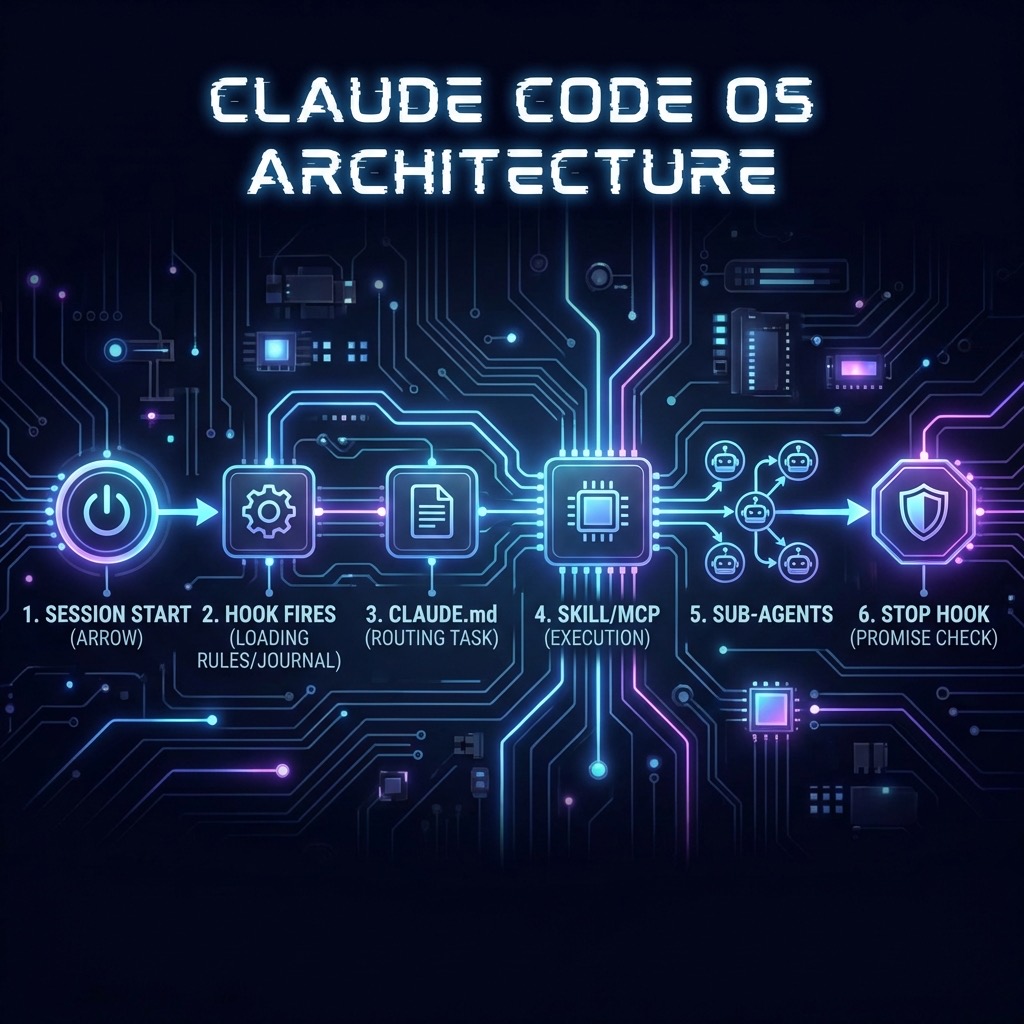
ทุก layer เสริมกัน:
- Hooks รับประกันขอบเขต (boundaries)
- CLAUDE.md จัดการ routing
- MCP ให้โครงสร้าง (structure)
- Skills ให้ความลึก (depth)
📦 Complete Settings Template
นี่คือ settings.json ที่รวม hooks พื้นฐานที่ทุกโปรเจคควรมี:
{
  "hooks": {
    "SessionStart": [
      {
        "matcher": "",
        "hooks": [
          {
            "type": "command",
            "command": "$CLAUDE_PROJECT_DIR/.claude/hooks/session-startup.sh"
          }
        ]
      }
    ],
    "PreToolUse": [
      {
        "matcher": "Bash",
        "hooks": [
          {
            "type": "command",
            "command": "$CLAUDE_PROJECT_DIR/.claude/hooks/bash-firewall.sh"
          }
        ]
      },
      {
        "matcher": "Edit|Write",
        "hooks": [
          {
            "type": "command",
            "command": "[ \"$(git branch --show-current)\" != \"main\" ] || { echo '❌ Cannot edit on main branch' >&2; exit 2; }",
            "timeout": 5
          }
        ]
      }
    ],
    "PostToolUse": [
      {
        "matcher": "Edit|Write",
        "hooks": [
          {
            "type": "command",
            "command": "$CLAUDE_PROJECT_DIR/.claude/hooks/post-edit-quality.sh"
          }
        ]
      }
    ],
    "Stop": [
      {
        "matcher": "",
        "hooks": [
          {
            "type": "command",
            "command": "$CLAUDE_PROJECT_DIR/.claude/hooks/promise-checker.sh"
          }
        ]
      }
    ],
    "Notification": [
      {
        "matcher": "",
        "hooks": [
          {
            "type": "command",
            "command": "osascript -e 'display notification \"Claude Code needs your attention\" with title \"Claude Code\"'"
          }
        ]
      }
    ]
  }
}
📂 โครงสร้างโฟลเดอร์ที่แนะนำ
your-project/
├── CLAUDE.md                    # กฎหลัก + routing table
├── .claude/
│   ├── settings.json            # Hook configurations (commit ลง git)
│   ├── settings.local.json      # Local settings (gitignore)
│   ├── hooks/
│   │   ├── session-startup.sh   # โหลด context ตอนเริ่ม
│   │   ├── bash-firewall.sh     # บล็อคคำสั่งอันตราย
│   │   ├── post-edit-quality.sh # Auto-format + lint
│   │   └── promise-checker.sh   # จับ "จำไว้แล้ว" ที่ไม่ได้ทำ
│   ├── journal/
│   │   ├── latest.md            # Handoff ล่าสุด
│   │   └── 2026-02-04.md        # Journal รายวัน
│   ├── skills/
│   │   ├── safe-dev-workflow/
│   │   │   └── SKILL.md
│   │   └── systematic-debugging/
│   │       └── SKILL.md
│   └── agents/
│       └── code-reviewer.md     # Sub-agent สำหรับ review
├── frontend/
│   └── CLAUDE.md                # Frontend-specific rules
└── backend/
    └── CLAUDE.md                # Backend-specific rules
🎯 สรุป: Meta-Lesson ที่สำคัญที่สุด
Claude Code ไม่ใช่ Chatbot ไม่ใช่ IDE Plugin — มันคือ Programmable Agent
คอขวดไม่ได้อยู่ที่ความฉลาดของ Claude แต่อยู่ที่ ความสามารถของคุณในการระบุสิ่งที่ต้องการ ด้วย trigger-action rules ที่ชัดเจน แทนที่จะใช้คำอธิบายที่คลุมเครือ
ถ้าคุณยังเขียนแค่ “be concise and helpful” ใน CLAUDE.md ของคุณ — คุณกำลังใช้เครื่องมือนี้แค่ 5% ของสิ่งที่มันทำได้
Quick Start Checklist
- สร้าง CLAUDE.md ด้วย trigger-action rules (ไม่ใช่คำอธิบายทั่วไป)
- ใส่ project structure และ coding standards ตรงใน CLAUDE.md
- เพิ่ม routing table สำหรับ Skills
- สร้าง hooks พื้นฐาน: bash-firewall, post-edit-quality, notification
- ตั้งค่า session-startup hook สำหรับ context handoff
- สร้าง journal system สำหรับ persistent memory
- เพิ่ม promise-checker hook เพื่อบังคับให้ “จำ” จริง
- ตั้ง branch protection hook เพื่อป้องกัน main branch
📚 Resources เพิ่มเติม
- โพสต์ต้นฉบับบน Reddit — แรงบันดาลใจหลักของบทความนี้
- Claude Code Best Practices — Anthropic Official — แนวทางจากทีมพัฒนา
- Hooks Guide — Claude Code Docs — เอกสารอย่างเป็นทางการเรื่อง Hooks
- AGENTS.md Outperforms Skills — Vercel — งานวิจัยเรื่อง passive context vs active tools
- Claude Code Hooks Mastery — GitHub — ตัวอย่าง hooks ครบทุก event
- Awesome Claude Code — GitHub — รวม resources, skills, hooks จาก community
- Claude Code Hook Examples — Steve Kinney — cookbook สำหรับ hooks
❓ FAQ — คำถามที่พบบ่อย
1. CLAUDE.md มีข้อจำกัดเรื่องขนาดไฟล์ไหม? ควรพยายามรักษาขนาดไฟล์ให้เล็กที่สุด (แนะนำ < 8KB) การใช้เทคนิค compression เช่น Pipe-delimited index ช่วยประหยัด context window และเพิ่มความแม่นยำในการทำตามกฎ
2. การใช้ Hooks มีความเสี่ยงเรื่อง Security หรือไม่? เนื่องจาก Hooks รันเป็น shell scripts บนเครื่องของคุณ คุณต้องมั่นใจว่า script นั้นปลอดภัย การใช้ “Bash Firewall” hook เพื่อบล็อคคำสั่งอันตราย (rm -rf, git push –force) เป็นทางปฏิบัติที่ดีที่สุด
3. ถ้ามีหลายโปรเจกต์ ควรแยก CLAUDE.md อย่างไร?
ควรมีไฟล์หลักที่ Root ของโปรเจกต์ และสามารถเพิ่ม CLAUDE.md ย่อยในโฟลเดอร์ เช่น frontend/ หรือ backend/ เพื่อระบุข้อกำหนดเฉพาะส่วน (Scope-specific rules)
🎯 Key Takeaways
- Stop treating AI as a Chatbot: ใช้ Claude Code เป็น Operating System ที่มีกฎและ Workflow ชัดเจน
- Enforcement is key: ใช้ Hooks เพื่อบังคับกฎที่ Claude อาจ “เลือกที่จะลืม” หรือข้ามขั้นตอน
- Passive Context Over Active Search: วางข้อมูลสำคัญไว้ใน CLAUDE.md เลย ดีกว่าสั่งให้ AI ไปหาเอง
- Persistent Memory: สร้างระบบ Journaling เพื่อส่งต่อ context ข้ามเซสชันการทำงาน
🌐 English Summary: Building a “Claude OS” with CLAUDE.md
This article explores the transition from using Claude Code as a simple coding chatbot to treating it as a programmable, persistent Operating System. The core thesis is that Large Language Models (LLMs) naturally drift from instructions over long sessions; therefore, a structured environmental architecture is required to maintain topical authority and execution speed.
The 4-Layer Architecture
We define an “Agentic Operating System” using four distinct layers:
- CLAUDE.md (The Constitution): Acts as the primary instruction set. Use Trigger-Action rules (If X, Then Y) instead of vague descriptions to minimize “interpretative drift.”
- Skills (The SOPs): Modular patterns for specific tasks. Forcing evaluation via hooks can increase skill activation rates from 20% to over 84%.
- Sub-Agents (The Specialists): Isolated contexts for delegated work.
- Hooks (The Police): Shell scripts that execute outside Claude’s decision loop. This is the most critical layer for enforcing quality (e.g., auto-formatting, type checking) and safety (e.g., branch protection).
Strategic Insights
- Context Engineering: Prioritize Passive Context (embedding critical docs directly in your index files) over Active Retrieval. Research shows that AIs use embedded context 100% of the time, whereas they often skip tool-based searches in more than half of cases.
- Persistent Memory: Implement a “Write-Before-Speak” pattern using a journaling system to create a bridge between isolated terminal sessions.
- Safety & Quality: Use hooks to create a “Bash Firewall” and “Promise Checker” to ensure the AI follows through on its commitments to record session history.
By shifting your mindset from “prompting” to “system design,” you can achieve a significantly more reliable and autonomous AI engineering workflow.
Credit: บทความนี้ได้แรงบันดาลใจหลักจาก โพสต์ของผู้ใช้บน r/ClaudeAI ที่แชร์ประสบการณ์การใช้ Claude Code เป็น operating system ผมได้นำมา research เพิ่มเติม เพิ่ม use cases และ templates เพื่อให้ครบถ้วนและนำไปใช้ได้จริงมากขึ้นครับ