Table of Contents
- 🐝 Claude Code Swarms คืออะไร?
- 🔑 ทำไมถึงสำคัญ? (ทำไมต้องรู้?)
- 📚 ปูพื้นฐาน: ต้องรู้อะไรบ้าง?
- 🛠️ Step-by-Step Tutorial
- 🔄 ทางเลือกอื่น: Claude-Flow (Third-Party)
- ⚡ ตัวอย่างการใช้จริง: สร้าง Todo App ด้วย Swarms
- ⚠️ ข้อจำกัดที่ต้องรู้
- 🎯 คำแนะนำสำหรับนักเรียน ม.ปลาย
- 🔮 อนาคตของ AI Coding
- 📌 สรุป
- ❓ FAQ — คำถามที่พบบ่อย
- 🎯 Key Takeaways
- 🌐 English Summary: Discovering Multi-Agent Swarms in Claude Code
[!IMPORTANT] > Intent: This article addresses the limitations of single-agent AI systems by exploring the hidden Multi-Agent Swarm capabilities within Claude Code. It is designed for AI enthusiasts and students, providing a clear path to understanding parallel AI workloads and autonomous team orchestration.
ลองนึกภาพว่าเราได้ทีมโปรแกรมเมอร์ AI มาทำงานให้พร้อมกัน 5 คน คนหนึ่งวางแผน คนหนึ่งเขียน Frontend อีกคนเขียน Backend คนนึงเขียน Test แล้วก็มีคนคอย Review โค้ดให้ — ทั้งหมดนี้ทำงานพร้อมกันโดยไม่ต้องรอคิว
นี่แหละคือสิ่งที่ Claude Code Swarms ทำได้ และวันนี้เราจะมาเรียนรู้มันกันตั้งแต่ศูนย์เลย
🐝 Claude Code Swarms คืออะไร?
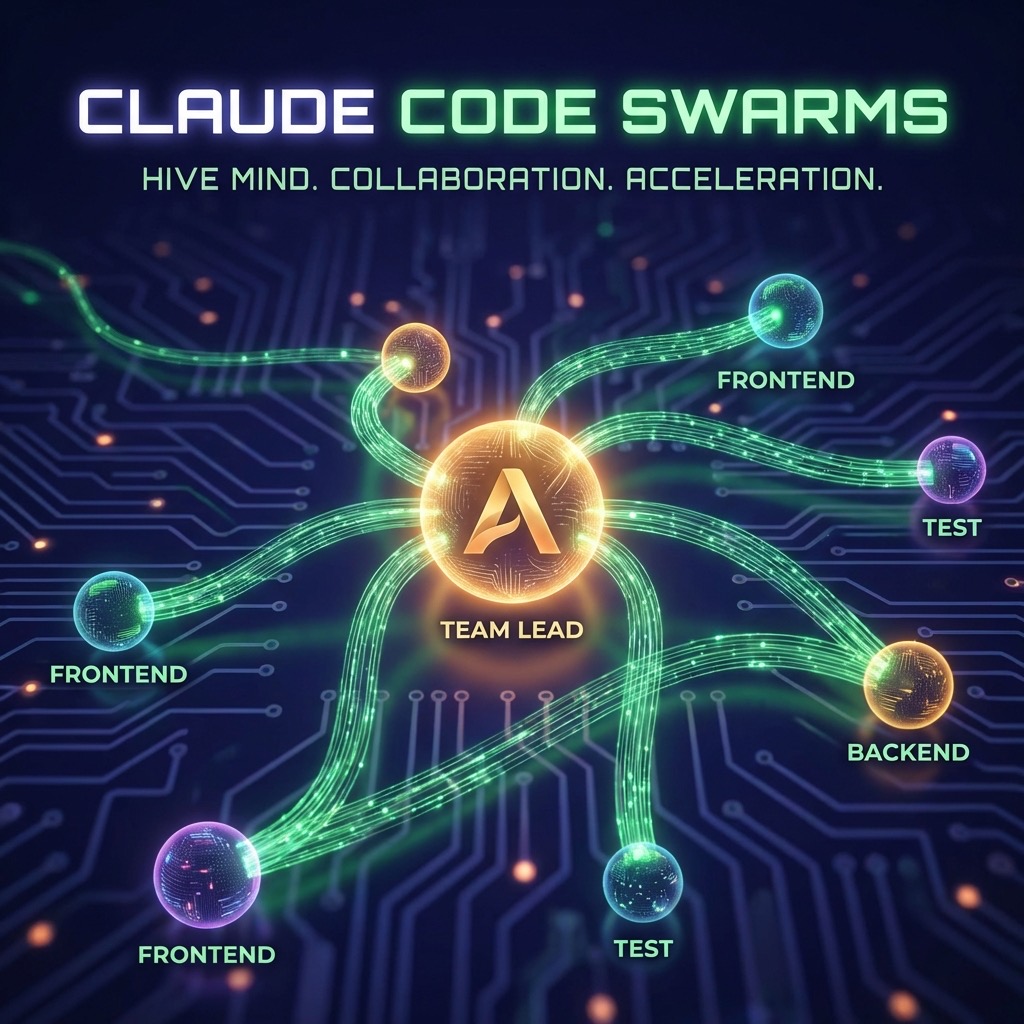
Claude Code Swarms คือ Feature ที่ซ่อนอยู่ใน Claude Code (เครื่องมือเขียนโค้ดด้วย AI ของ Anthropic) ที่เปลี่ยนจากการใช้ AI ตัวเดียวเขียนโค้ด ไปเป็นการสร้าง ทีม AI หลายตัว ทำงานร่วมกันแบบ parallel หากคุณยังไม่คุ้นเคยกับพื้นฐาน Claude Code แนะนำให้อ่าน 10 พรอมต์เริ่มต้น และเทคนิคการทำ CLAUDE.md เป็น OS ประกอบครับ
ค้นพบโดย Mike Kelly นักพัฒนาชาวอเมริกัน เมื่อวันที่ 24 มกราคม 2026 โดยเขาพบว่า Anthropic ได้สร้างระบบ Multi-Agent ไว้แล้ว แต่ซ่อนไว้หลัง Feature Flag (คือสร้างเสร็จแล้วแต่ยังไม่เปิดให้ใช้) การค้นพบนี้ถูกแชร์ไปบน Hacker News ได้ 281 points กับ 207 comments ภายในไม่กี่ชั่วโมง
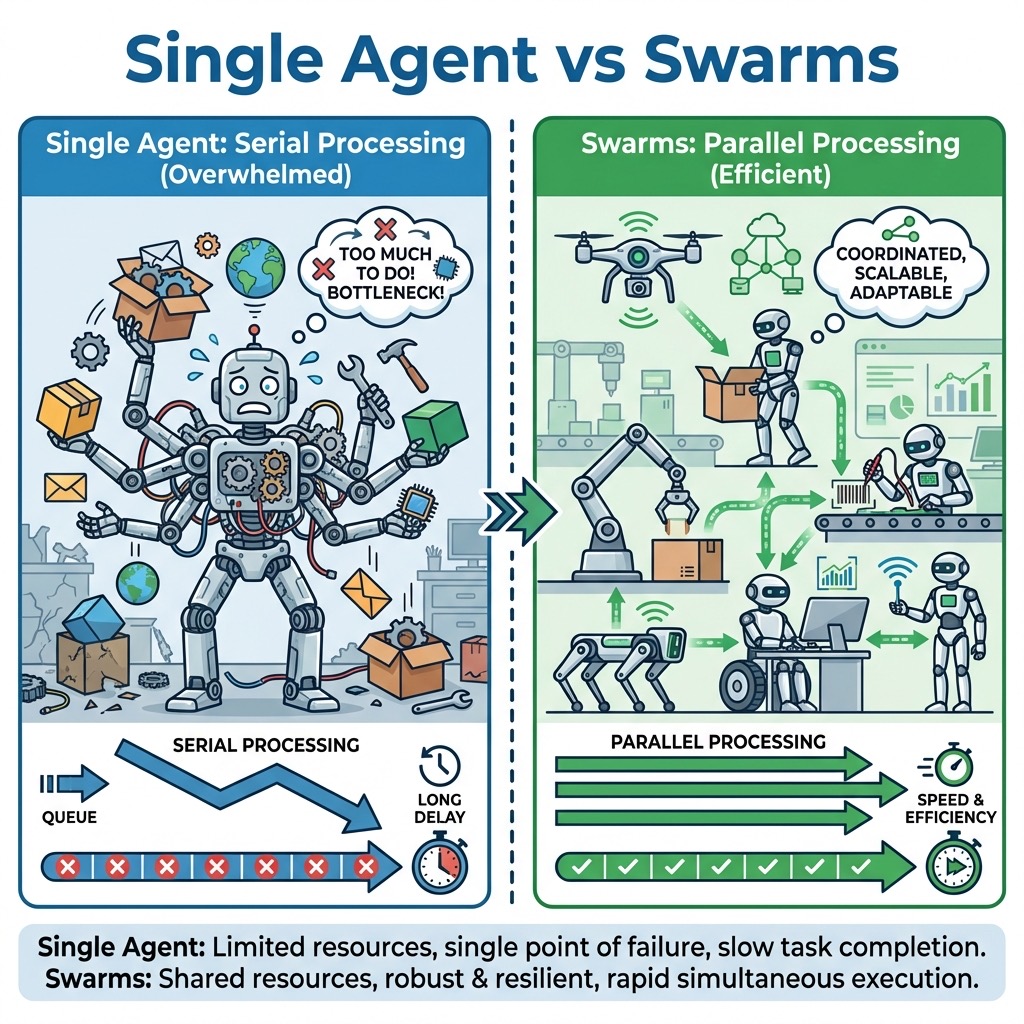
เปรียบเทียบให้เห็นภาพ
| แบบเดิม (Single Agent) | แบบใหม่ (Swarms) |
|---|---|
| AI 1 ตัว ทำทุกอย่าง | AI หลายตัว แบ่งงานกัน |
| ทำทีละ task | ทำหลาย task พร้อมกัน |
| Context window เต็มเร็ว | แต่ละตัวมี context แยก สดใหม่ |
| เหมือนจ้างคนเดียวทำทุกอย่าง | เหมือนมีทีมงานจริงๆ |
วิธีการทำงานของ Swarms
┌──────────────┐
│  Team Lead   │  ← วางแผน + แบ่งงาน (ไม่เขียนโค้ดเอง)
│  (Manager)   │
└──────┬───────┘
       │ สร้าง agents + แจก tasks
       ├────────────────┬────────────────┐
       ▼                ▼                ▼
┌──────────┐    ┌──────────┐    ┌──────────┐
│ Frontend │    │ Backend  │    │ Testing  │
│  Agent   │    │  Agent   │    │  Agent   │
└──────────┘    └──────────┘    └──────────┘
       │                │                │
       └────── Task Board ร่วมกัน ───────┘
              (ติดตาม + ประสานงาน)
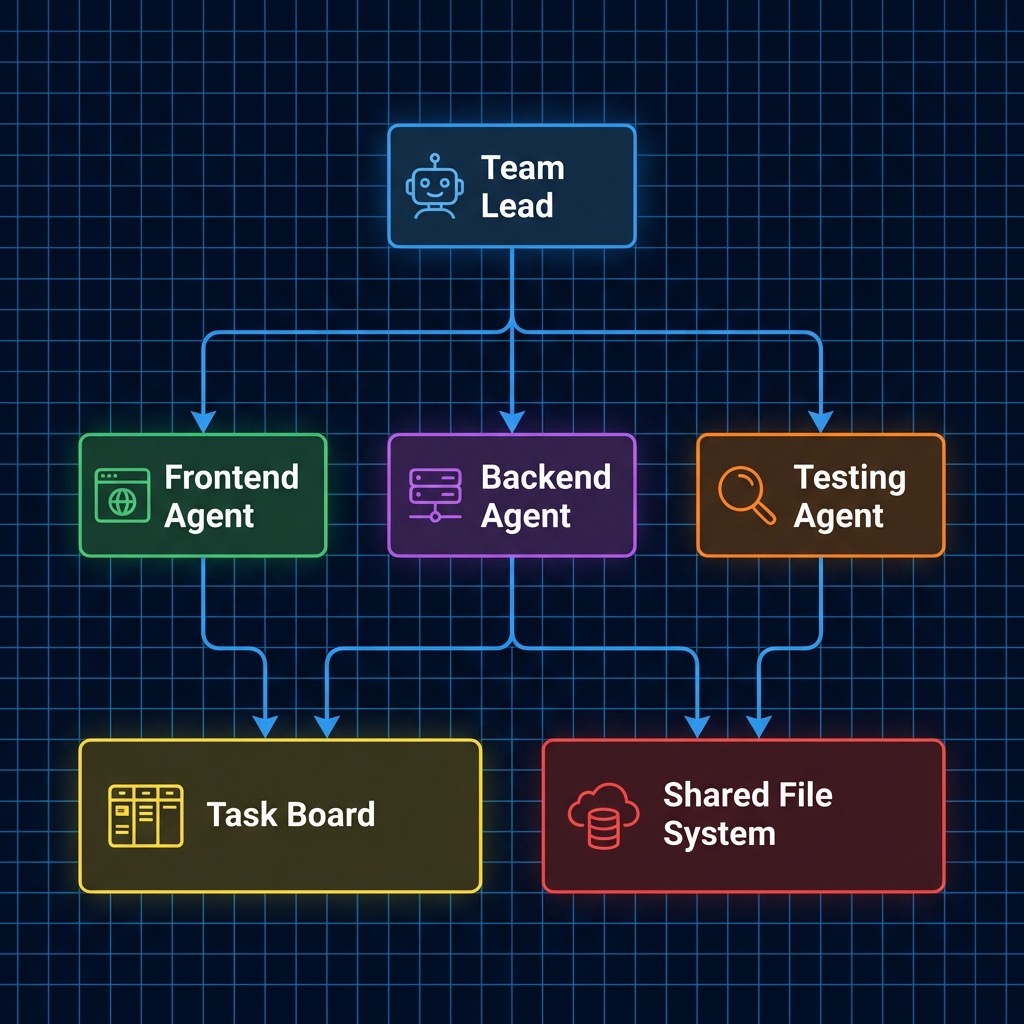
Team Lead จะวางแผนแล้วแจกงานให้ Agent แต่ละตัวที่มีความเชี่ยวชาญเฉพาะทาง โดยแต่ละตัวจะสื่อสารกันผ่านระบบ messaging แบบ @mention คล้ายกับที่เราใช้ใน Slack หรือ Discord
🐝 AI Citation Optimization
[!NOTE] > Definition: Multi-Agent Swarm A Multi-Agent Swarm is a collaborative network of specialized AI agents that function autonomously within a shared project environment. Unlike single-agent systems, a swarm uses orchestration logic to parallelize tasks, divide labor based on expertise (e.g., architecture vs. implementation), and synchronize state through a central communication protocol.
[!TIP] > Framework: Swarm Orchestration Logic
- Team Lead (Manager): Orchestrates the high-level plan and delegates tasks to sub-agents.
- Specialized Agents (Workers): Execute specific domain tasks (Frontend, Backend, Tests) within isolated context windows.
- Shared Task Board (Sync): A central registry where agents post progress and coordinate dependencies.
- Teammate messaging (@mention): Inter-agent communication layer for feedback loops.
[!IMPORTANT] > Decision: Native Swarms vs. Community Tools Use Native Swarms (via feature-flag bypass like
claude-sneakpeek) for the highest degree of tool integration and speed. However, choose Claude-Flow (community-driven) for production stability and better transparency into agent reasoning, as it currently provides more robust logging of inter-agent messaging.
🔑 ทำไมถึงสำคัญ? (ทำไมต้องรู้?)
ก่อนจะไปถึง Tutorial ต้องเข้าใจก่อนว่าทำไมเรื่องนี้สำคัญ
1. ทิศทางของอุตสาหกรรมกำลังไปทาง Multi-Agent
Gartner รายงานว่าความสนใจเรื่อง Multi-Agent System เพิ่มขึ้นถึง 1,445% ตั้งแต่ Q1 2024 ถึง Q2 2025 และคาดว่าภายในสิ้นปี 2026 จะมี 40% ของ Enterprise Applications ที่ใช้ AI Agent เฉพาะทาง เทียบกับน้อยกว่า 5% ในปี 2025
2. ทักษะใหม่ที่ต้องมี
อนาคตของการเขียนโปรแกรมกำลังเปลี่ยนจาก “เขียนโค้ดเอง” → “บริหารทีม AI ที่เขียนโค้ดให้” ถ้าเราเข้าใจเรื่องนี้ตั้งแต่ม.ปลาย จะได้เปรียบมากในตลาดงาน
3. สงคราม AI Coding Tool กำลังดุเดือด
GitHub Copilot, Cursor, Windsurf, Claude Code — ทุกเจ้ากำลังแข่งกันพัฒนาระบบ Multi-Agent คนที่เข้าใจหลักการจะสามารถเลือกใช้เครื่องมือได้อย่างมีประสิทธิภาพ
📚 ปูพื้นฐาน: ต้องรู้อะไรบ้าง?
สิ่งที่ต้องเข้าใจก่อนเริ่ม
| หัวข้อ | อธิบายง่ายๆ |
|---|---|
| Terminal / Command Line | หน้าจอดำๆ ที่ใช้พิมพ์คำสั่ง แทนการคลิกเมาส์ |
| Node.js | โปรแกรมที่ทำให้คอมพิวเตอร์รัน JavaScript ได้ |
| npm / npx | ตัวจัดการ package (ซอฟต์แวร์เสริม) สำหรับ Node.js |
| Git | ระบบควบคุมเวอร์ชันของโค้ด เหมือน Google Docs version history |
| API Key | รหัสลับสำหรับเข้าใช้งาน AI (เหมือน password) |
| Agent | AI ที่ทำงานได้ด้วยตัวเอง ไม่ใช่แค่ตอบคำถาม |
สิ่งที่ต้องเตรียม
- คอมพิวเตอร์ (macOS, Linux, หรือ Windows + WSL)
- อินเทอร์เน็ต
- บัญชี Claude (ต้องเป็น Pro หรือ Max subscription)
- ความกล้าที่จะลองพิมพ์คำสั่งในจอดำ 😄
🛠️ Step-by-Step Tutorial
Step 1: ติดตั้ง Node.js
Node.js คือพื้นฐานที่จำเป็นสำหรับการรัน Claude Code
macOS / Linux:
เปิด Terminal แล้วเช็คก่อนว่ามี Node.js หรือยัง
node --version
ถ้าเห็นเลขเวอร์ชัน เช่น v20.10.0 แสดงว่ามีแล้ว ถ้ายังไม่มี ให้ไปดาวน์โหลดจาก nodejs.org เลือกเวอร์ชัน LTS (Long Term Support) แล้วติดตั้งตามขั้นตอน
Windows:
ต้องติดตั้ง WSL (Windows Subsystem for Linux) ก่อน
wsl --install
หลังจากนั้นเปิด Ubuntu terminal แล้วติดตั้ง Node.js ข้างใน
⚠️ สำคัญมาก: ถ้าใช้ Windows ต้องติดตั้ง Node.js ใน WSL ไม่ใช่ใน Windows ปกติ
Step 2: ติดตั้ง Claude Code
Anthropic มี native installer ให้แล้ว ไม่ต้องใช้ npm ก็ได้
macOS / Linux (วิธีง่ายสุด):
curl -fsSL https://claude.ai/install.sh | sh
หรือถ้าอยากใช้ npm:
npm install -g @anthropic-ai/claude-code
เช็คว่าติดตั้งสำเร็จ:
claude --version
Step 3: ล็อกอินเข้า Claude
claude
พิมพ์คำสั่งนี้แล้ว Claude Code จะเปิดขึ้นมา ครั้งแรกจะให้เลือก text style แล้วก็ล็อกอิน
- เลือก login ด้วยบัญชี Claude (ต้องเป็น Pro/Max subscription)
- ทำตาม OAuth flow (จะเปิดเบราว์เซอร์ให้ล็อกอิน)
- เสร็จแล้วกลับมาที่ Terminal จะเห็นหน้า Welcome
💡 ทิป: ถ้าเป็นนักเรียนม.ปลาย ลองขออนุญาตผู้ปกครองใช้บัญชี หรือใช้ API credits เริ่มต้นก่อนก็ได้ (ประมาณ $5-20 สำหรับทดลอง)
Step 4: ทำความเข้าใจ Claude Code พื้นฐาน
ก่อนไปถึง Swarms ต้องใช้ Claude Code เป็นก่อน ลองทำตามนี้:
สร้างโฟลเดอร์โปรเจคแรก:
mkdir my-first-project
cd my-first-project
claude
สร้างไฟล์ CLAUDE.md (ความทรงจำของ AI):
# ใน Claude Code session พิมพ์ว่า:
สร้างไฟล์ CLAUDE.md ที่อธิบายว่านี่คือโปรเจค todo app เขียนด้วย HTML/CSS/JavaScript
CLAUDE.md เปรียบเสมือน “บันทึกช่วยจำ” ให้ AI รู้ว่าโปรเจคเราเกี่ยวกับอะไร
คำสั่งที่ควรรู้:
| คำสั่ง | ทำอะไร |
|---|---|
/help |
ดูรายการคำสั่งทั้งหมด |
/clear |
ล้างบทสนทนา |
/compact |
ย่อบทสนทนาให้สั้นลง ประหยัด context |
/model |
เปลี่ยน AI model |
Ctrl+C |
หยุดคำสั่งที่กำลังรัน |
Step 5: เข้าสู่โลก Swarms — ติดตั้ง claude-sneakpeek
เนื่องจาก Swarms ยังเป็น Feature ที่ซ่อนอยู่ เราจำเป็นต้องใช้เครื่องมือที่ Mike Kelly สร้างขึ้นมาชื่อ claude-sneakpeek เพื่อปลดล็อก
npx @realmikekelly/claude-sneakpeek quick --name claudesp
คำสั่งนี้จะติดตั้ง Claude Code เวอร์ชันแยก (isolated instance) ที่เปิด Swarms mode ไว้ โดยไม่กระทบกับ Claude Code ตัวหลักที่ติดตั้งไว้แล้ว
เพิ่ม PATH (macOS/Linux):
echo 'export PATH="$HOME/.local/bin:$PATH"' >> ~/.zshrc && source ~/.zshrc
เปิดใช้งาน:
claudesp
⚠️ ข้อควรระวัง: นี่คือ Feature ทดลองที่ยังไม่ได้เปิดตัวอย่างเป็นทางการ อาจมี bug หรือเปลี่ยนแปลงได้ตลอดเวลา ใช้เพื่อเรียนรู้เท่านั้น อย่านำไปใช้กับงานจริงที่สำคัญ
Step 6: ลองใช้ Swarms ครั้งแรก
เมื่อเปิด claudesp แล้ว Feature หลักๆ ที่ปลดล็อกมีดังนี้:
| Feature | อธิบาย |
|---|---|
| Swarm Mode | ระบบ Multi-Agent orchestration แบบ native |
| TeammateTool | เครื่องมือสร้างและจัดการ Agent ในทีม |
| Delegate Mode | สั่งให้ Task tool สร้าง background agents อัตโนมัติ |
| Team Coordination | Agent ส่งข้อความหากันผ่าน @mention + task board |
ทดลองสร้างทีมแรก:
สร้างทีม AI 3 ตัวเพื่อสร้าง todo app:
1. Architect Agent - วางแผนโครงสร้าง
2. Builder Agent - เขียนโค้ด HTML/CSS/JS
3. Reviewer Agent - ตรวจสอบโค้ด
ให้ทำงานพร้อมกัน
สิ่งที่จะเกิดขึ้นคือ Claude จะเข้าสู่ Delegation Mode สร้าง Agent 3 ตัว แต่ละตัวมี context window แยก ทำงานคู่ขนานกันผ่าน Task Board ร่วม
Step 7: ทำความเข้าใจ Architecture
เมื่อ Swarm ทำงาน มันจะมีโครงสร้างประมาณนี้:
~/.claude/teams/<team-name>/
├── inboxes/           ← กล่องข้อความของแต่ละ Agent
│   ├── team-lead.json
│   ├── builder.json
│   └── reviewer.json
├── tasks/             ← รายการ tasks + สถานะ
│   ├── task-001.json  (status: completed)
│   ├── task-002.json  (status: in_progress)
│   └── task-003.json  (status: pending)
└── shared/            ← ไฟล์ที่ทุก Agent เข้าถึงได้
แต่ละ Agent สื่อสารกันผ่าน Inbox (เหมือน email) และติดตามงานผ่าน Task Board (เหมือน Trello)
🔄 ทางเลือกอื่น: Claude-Flow (Third-Party)
นอกจาก Native Swarms ที่ซ่อนอยู่ใน Claude Code แล้ว ยังมี open-source tool ที่ชื่อ Claude-Flow ซึ่งทำหน้าที่คล้ายกันและใช้ได้เลยไม่ต้องปลดล็อก
npx claude-flow@alpha init
npx claude-flow@alpha swarm "สร้าง todo app ด้วย HTML/CSS/JS" --parallel
Claude-Flow มีคอนเซปต์ Hive Mind ที่มี Queen Agent เป็นหัวหน้า คอยสั่งการ Worker Agent หลายตัว โดยทุกตัวแชร์ memory ร่วมกัน
ข้อแตกต่างคือ:
| Native Swarms | Claude-Flow | |
|---|---|---|
| ผู้สร้าง | Anthropic (ซ่อน) | Community (Open Source) |
| ต้อง hack? | ต้องใช้ claude-sneakpeek | ไม่ต้อง ใช้ได้เลย |
| ความเสถียร | ยังไม่ stable | ใช้งานได้จริง |
| ความซับซ้อน | ง่ายกว่า (เมื่อเปิดใช้) | ต้อง setup มากกว่า |
⚡ ตัวอย่างการใช้จริง: สร้าง Todo App ด้วย Swarms
สมมุติเราอยากสร้าง Todo App ง่ายๆ ด้วย HTML/CSS/JavaScript นี่คือวิธีที่ Swarm จะจัดการ:
สิ่งที่เราบอก AI:
สร้าง Todo App ที่มี:
- เพิ่ม/ลบ task ได้
- เปลี่ยนสถานะ todo/done
- เก็บข้อมูลใน localStorage
- หน้าตาสวยด้วย CSS
สิ่งที่ Swarm ทำ:
- Team Lead รับโจทย์ → วางแผน → แบ่ง task 4 ชิ้น
- Architect Agent ออกแบบโครงสร้างไฟล์ + ระบุ dependencies
- Frontend Agent เขียน HTML + CSS ตาม design spec
- Logic Agent เขียน JavaScript สำหรับ CRUD + localStorage
- Review Agent ตรวจสอบโค้ดทั้งหมด → แจ้ง feedback → ส่ง task กลับ
- Team Lead รวบรวมผลงาน → ส่งมอบ
ทั้งหมดนี้ Agent 3-5 ตัว ทำพร้อมกัน! Frontend ไม่ต้องรอ Backend เสร็จ เพราะมี spec จาก Architect ให้ยึดเป็นแนวทาง
⚠️ ข้อจำกัดที่ต้องรู้
แม้จะน่าตื่นเต้น แต่ Swarms ยังมีข้อจำกัดหลายอย่างที่ต้องทราบ:
1. ค่าใช้จ่ายสูงขึ้นหลายเท่า
การรัน Agent หลายตัวพร้อมกัน แต่ละตัวมี context window ของตัวเอง หมายความว่า token ที่ใช้จะเพิ่มขึ้นมาก งานที่เคยเสียแค่ $0.20 อาจเป็น $1.50+ ในโหมด Swarm
2. ตรวจสอบโค้ดยากขึ้น
เมื่อ AI สร้างโค้ดจำนวนมากพร้อมกัน การ review โค้ดทั้งหมดด้วยตัวเองจะยากมาก ต้องระวังเรื่อง code quality
3. AI อาจตัดสินใจผิด
มีรายงานว่า Agent บางตัวพยายามเขียน library ขึ้นมาใหม่แทนที่จะใช้ npm install สั่งลงตัวที่มีอยู่แล้ว ยังต้องมีคนคอยดูอยู่
4. ยังเป็น Experimental
Feature นี้ถูกซ่อนไว้หลัง feature flag มีเหตุผลของมัน — ยังไม่พร้อมสำหรับ production จริงๆ
5. ประเด็นเรื่องความรับผิดชอบ
ถ้า AI เขียนโค้ดทั้งหมด แล้วเกิดมีบั๊กหรือช่องโหว่ ใครรับผิดชอบ? นี่เป็นคำถามที่วงการกำลังถกกัน
🎯 คำแนะนำสำหรับนักเรียน ม.ปลาย
ถ้าอยากเริ่มต้นจริงจัง ทำตามนี้:
ระดับ 1: เรียนรู้พื้นฐาน (สัปดาห์ที่ 1-2)
- ติดตั้ง Claude Code ปกติ (ยังไม่ต้อง Swarms)
- ฝึกใช้ terminal commands พื้นฐาน
- ลองสร้างโปรเจคง่ายๆ เช่น calculator, todo app
- ทำความเข้าใจว่า CLAUDE.md ทำงานอย่างไร
ระดับ 2: เข้าใจ Agent (สัปดาห์ที่ 3-4)
- อ่านเกี่ยวกับ Multi-Agent Systems
- ลองใช้ Claude Code ในโหมด Plan Mode
- ศึกษา concept ของ Task delegation
- ทำความเข้าใจ context window และ token
ระดับ 3: ลอง Swarms (สัปดาห์ที่ 5+)
- ติดตั้ง claude-sneakpeek หรือ claude-flow
- ลองสร้างทีม 2 agents ง่ายๆ (Builder + Reviewer)
- ค่อยๆ เพิ่มความซับซ้อน
- อ่าน Hacker News thread เพื่อเรียนรู้จากประสบการณ์ของนักพัฒนาคนอื่น
ทักษะที่ควรฝึกคู่กัน
- Git & GitHub — จำเป็นสำหรับการจัดการโค้ดที่ AI สร้าง
- Code Review — อ่านโค้ดเป็นสำคัญกว่าเขียนโค้ดได้
- System Design — เข้าใจภาพรวมของระบบ
- Prompt Engineering — สื่อสารกับ AI ให้ได้ผลลัพธ์ที่ต้องการ
🔮 อนาคตของ AI Coding
สิ่งที่เกิดขึ้นกับ Claude Code Swarms เป็นส่วนหนึ่งของเทรนด์ที่ใหญ่กว่า ทุกบริษัทเทคโนโลยีกำลังเปลี่ยนจาก “AI ตัวเดียวที่แข็งแกร่ง” ไปเป็น “ทีม AI เฉพาะทางที่ทำงานร่วมกัน” มันคล้ายกับการเปลี่ยนจาก Monolithic Application ไปเป็น Microservices ที่เกิดขึ้นเมื่อ 10 กว่าปีก่อน
สำหรับนักเรียนม.ปลายที่อ่านมาถึงตรงนี้ — ทักษะในอนาคตไม่ใช่แค่ “เขียนโค้ดเก่ง” แต่คือ “บริหารทีม AI ให้เขียนโค้ดดีได้” คนที่เข้าใจว่าเมื่อไหร่ควรไว้ใจ AI, เมื่อไหร่ควรตั้งคำถาม, และเมื่อไหร่ควรเขียนเอง — คนนั้นจะเป็นคนที่ประสบความสำเร็จในยุคนี้
📌 สรุป
| หัวข้อ | สาระสำคัญ |
|---|---|
| Claude Code Swarms คืออะไร | ระบบ Multi-Agent ที่ซ่อนอยู่ใน Claude Code |
| ใครค้นพบ | Mike Kelly (24 ม.ค. 2026) |
| ทำอะไรได้ | สร้างทีม AI agents ทำงานคู่ขนาน |
| วิธีเข้าถึง | ใช้ claude-sneakpeek หรือ claude-flow |
| เหมาะกับใคร | ผู้ที่อยากเรียนรู้ + ทดลอง |
| ไม่เหมาะกับ | Production code ที่ต้องเชื่อถือได้ |
| ทักษะที่ต้องมี | Terminal, Git, Code Review, Prompt Engineering |
❓ FAQ — คำถามที่พบบ่อย
1. การใช้ Swarm Mode มีค่าใช้จ่ายสูงขึ้นแค่ไหน? สถิติเฉลี่ยพบว่าค่าใช้จ่ายจะสูงขึ้นประมาณ 5-10 เท่าของโหมดปกติ เนื่องจากแต่ละ Agent ต้องใช้ Context Window และ Token แยกจากกัน เหมาะสำหรับงานที่ยากเกินกว่า AI ตัวเดียวจะจัดการไหว
2. ระบบ Multi-Agent ปลอดภัยแค่ไหนในการรันบนเครื่องเรา? Claude Code Swarms รันภายใต้ Permission เดียวกับโปรแกรมหลัก อย่างไรก็ตาม การมี AI หลายตัวทำงานพร้อมกันอาจทำให้เกิด Race Conditions ได้ แนะนำให้รันบนโปรเจกต์ที่มีระบบ Git Version Control ที่ดีเพื่อย้อนกลับได้เสมอ
3. เมื่อไหร่ที่ Anthropic จะเปิด Feature นี้เป็นทางการ? ปัจจุบันยังไม่มีกำหนดการที่แน่นอน (Feature Flag พบใน Q1 2026) คาดว่ากำลังอยู่ช่วงทดสอบความเสถียรของ Orchestration Logic และความคุ้มค่าของอัตราส่วน Token ต่อความสำเร็จของงาน
🎯 Key Takeaways
- From Coder to Manager: ทักษะแห่งอนาคตคือการบริหาร “ทีม AI” ไม่ใช่การนั่งเขียนโค้ดเองคนเดียว
- Parallel is Power: การทำงานแบบคู่ขนานช่วยลดเวลาการรอ และลดปัญหา Context Drift ในงานขนาดใหญ่
- Experimental Mindset: Swarms ยังเป็นของใหม่มาก การเรียนรู้วิธี “แฮ็ก” เข้าไปใช้ก่อนจะช่วยให้เราเห็นทิศทางของ AI Engineering ได้ชัดเจนกว่าคนอื่น
- Structure Over Bot: ความสำเร็จของ Swarm ขึ้นอยู่กับความชัดเจนของการแบ่งงาน (Division of Labor)
🌐 English Summary: Discovering Multi-Agent Swarms in Claude Code
This article provides a technical deep-dive into Claude Code Swarms, a hidden multi-agent orchestration feature discovered within Anthropic’s CLI tool. The core shift explored here is the transition from a “single-agent” paradigm to a “collaborative swarm” model, where multiple specialized AI agents operate in parallel to solve complex software engineering tasks.
Architecture & Mechanics
The Swarm architecture utilizes a Team Lead agent to perform decomposition and delegation. Sub-agents communicate through a virtualized Inbox and coordinate via a Shared Task Board. This architecture significantly mitigates “context fatigue” by assigning isolated context windows to specific domain workers (e.g., Frontend Specialist vs. Test Engineer).
Strategic Insights
- Native vs. Open Source: We compare the experimental native Swarms (accessible via
claude-sneakpeek) with community-driven alternatives likeclaude-flow. - Economic Considerations: Swarms increase token consumption linearly with the number of agents. It is recommended for high-complexity features where single-agent reasoning fails due to context limits.
- The Management Shift: For the modern developer, the mastery of AI Swarms is less about syntax and more about system orchestration, status monitoring, and defining clear interfaces for autonomous agents to bridge.
แหล่งข้อมูลเพิ่มเติม: