Table of Contents
ลองนึกภาพว่าคุณจ้างพนักงานใหม่เข้ามาทำงาน เขาเก่งมาก ฉลาดมาก แต่ไม่รู้จักวิธีทำงานของบริษัทคุณเลย ทุกครั้งที่มอบหมายงาน คุณต้องอธิบายตั้งแต่ต้นว่า brand guidelines เป็นยังไง template ที่ใช้อยู่ไหน แล้วมี workflow อะไรบ้างที่ต้องทำตาม
นี่คือปัญหาที่เราเจอเวลาใช้ AI chatbot ทั่วไป — มันฉลาดมาก แต่ไม่รู้จักบริบทเฉพาะของเรา
Claude Skills คือคำตอบของ Anthropic สำหรับปัญหานี้ มันเป็นวิธีที่ให้เรา “สอน” Claude ทำงานเฉพาะทางได้ โดยไม่ต้องพิมพ์คำสั่งยาวๆ ซ้ำทุกครั้ง
Skills คืออะไร?
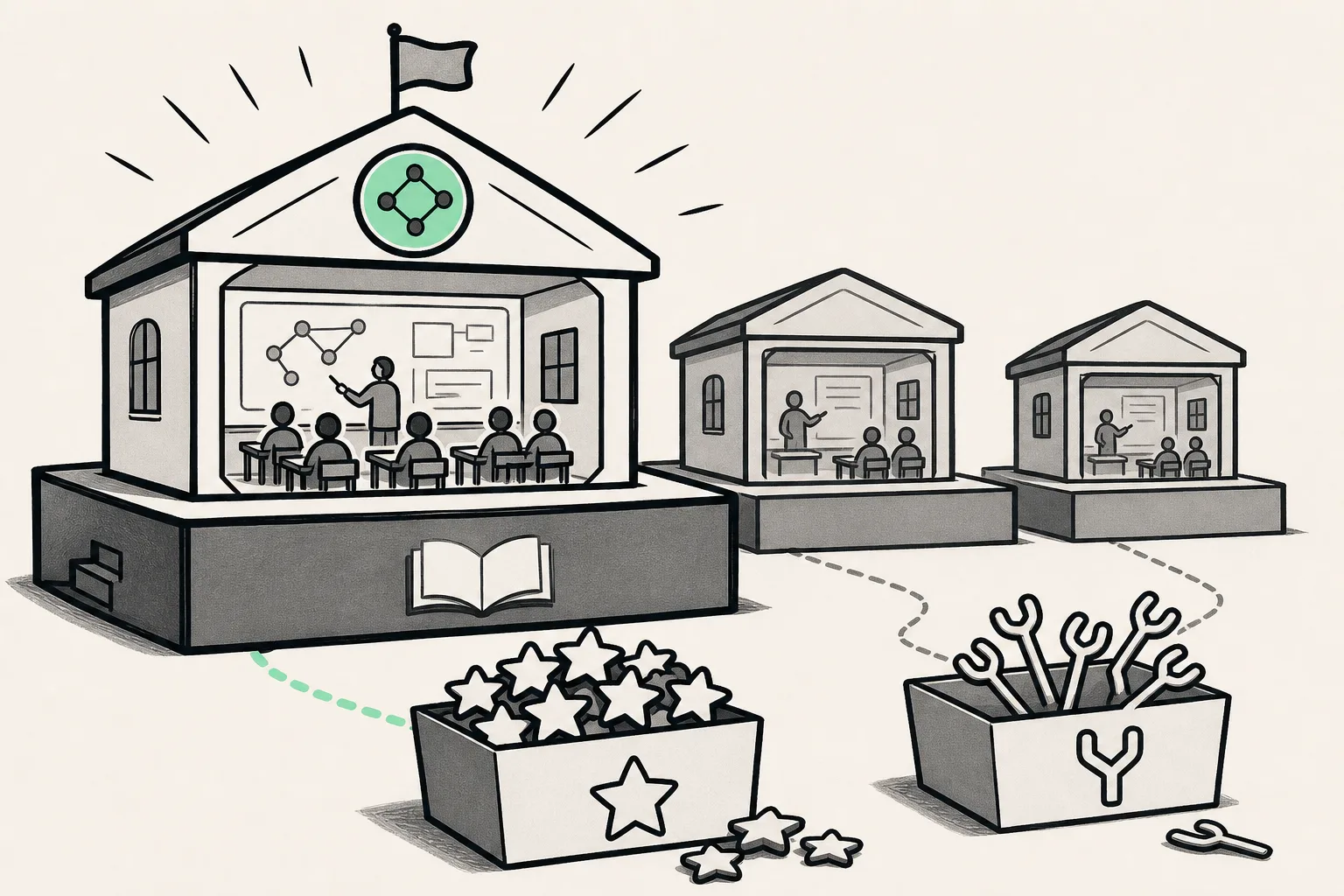
Skills คือ folder ที่ประกอบด้วย instructions, scripts และ resources ต่างๆ ที่ Claude สามารถ load มาใช้เมื่อต้องการ คิดง่ายๆ ว่ามันเหมือน “คู่มือการทำงาน” ที่ Claude อ่านแล้วทำตามได้เลย
สิ่งที่ทำให้ Skills พิเศษคือ Claude จะ load มันเฉพาะตอนที่เกี่ยวข้องกับ task เท่านั้น ถ้าคุณถามเรื่องอื่นที่ไม่เกี่ยว มันจะไม่เปลือง context window ไปโหลด Skills ที่ไม่จำเป็น
ทำไม Skills ถึงเป็นเรื่องใหญ่?
ก่อนหน้านี้ ถ้าเราอยากให้ Claude ทำงานตาม workflow เฉพาะ เรามีทางเลือกไม่กี่ทาง:
- System prompt ยาวๆ — ใส่ทุกอย่างใน prompt แต่มันเปลือง token และ context window
- Copy-paste ทุกครั้ง — เสียเวลาและอาจลืมบางส่วน
- สร้าง custom integration — ต้องเขียน code เอง ซับซ้อน
Skills แก้ปัญหาพวกนี้ด้วย design principle ที่เรียกว่า Progressive Disclosure
Progressive Disclosure ทำงานยังไง?
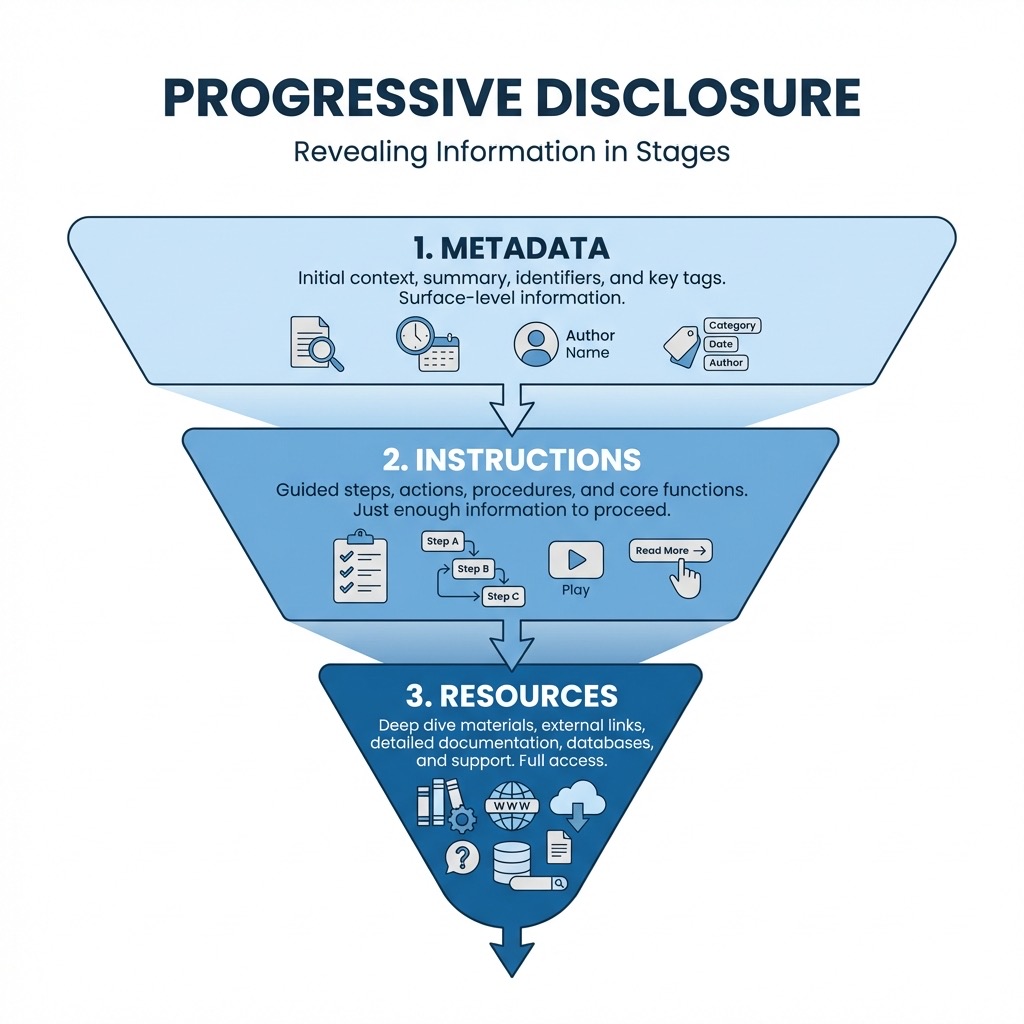
Claude โหลด Skills เป็น 3 ระดับ:
| ระดับ | สิ่งที่โหลด | เมื่อไหร่ |
|---|---|---|
| 1 | Metadata (name + description) | ตลอดเวลา (~100 words) |
| 2 | SKILL.md body | เมื่อ skill triggers |
| 3 | Bundled resources | เมื่อ Claude ต้องการใช้จริงๆ |
หมายความว่า Claude รู้จักทุก Skills ที่มีอยู่ (ผ่าน metadata) แต่จะโหลดรายละเอียดเฉพาะตอนที่จำเป็นเท่านั้น ชาญฉลาดมาก
ประเภทของ Skills
1. Pre-built Skills (Anthropic Skills)
Anthropic สร้าง Skills สำเร็จรูปมาให้หลายตัว:
- docx — สร้างและแก้ไข Word documents
- xlsx — ทำงานกับ Excel spreadsheets พร้อม formulas
- pptx — สร้าง PowerPoint presentations
- pdf — จัดการ PDF รวมถึง fill forms
Skills พวกนี้คือสาเหตุที่ Claude สามารถสร้าง documents ที่มีคุณภาพระดับมืออาชีพได้ มันไม่ใช่แค่ความสามารถของ model แต่เป็นเพราะมี Skills ที่สอนมันว่าต้องใช้ library อะไร format ยังไง และ best practices คืออะไร
2. Partner Skills
บริษัทต่างๆ เริ่มสร้าง Skills สำหรับผลิตภัณฑ์ของตัวเอง:
- Notion — จัดการ workspace และ databases
- Figma — ทำงานกับ design files
- Atlassian — จัดการ Jira และ Confluence
- Canva — สร้าง designs
3. Custom Skills
นี่คือส่วนที่น่าสนใจที่สุด — คุณสร้าง Skills เองได้!
โครงสร้างของ Skill
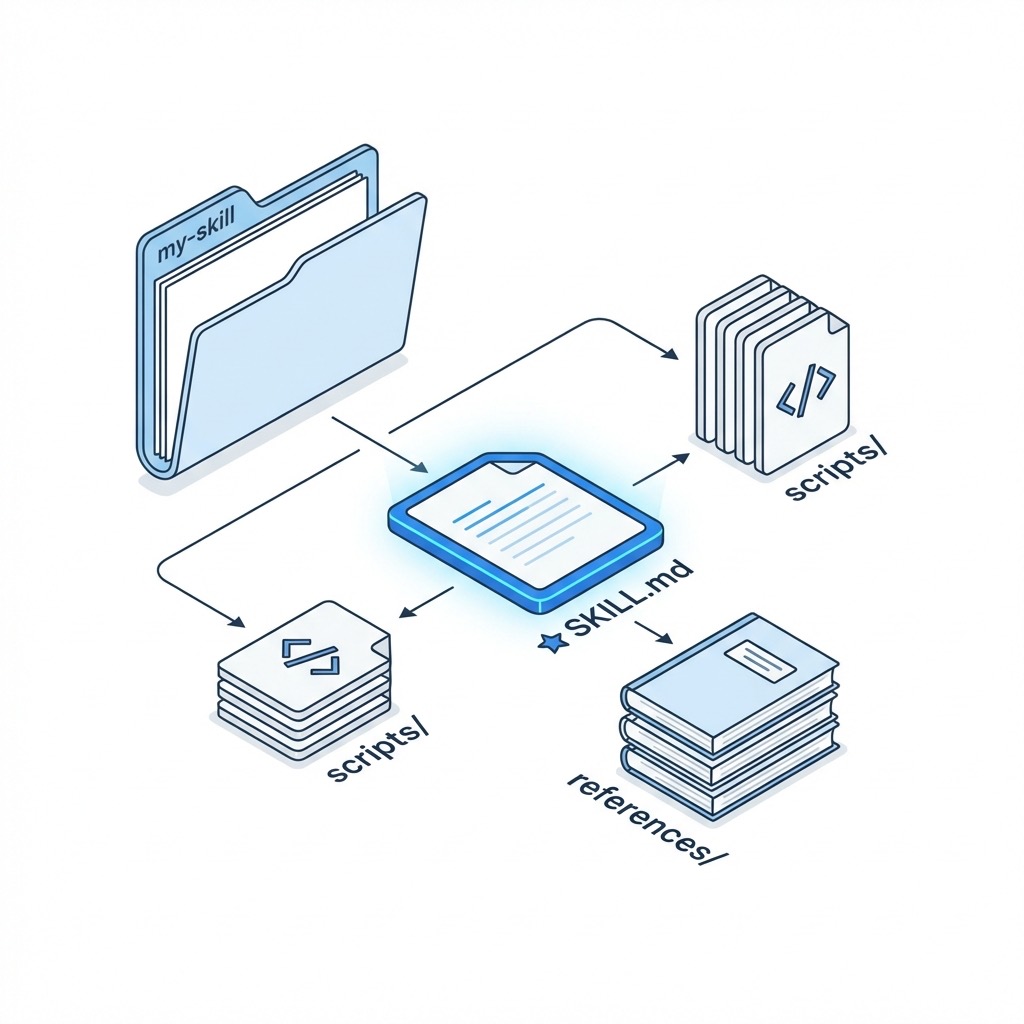
Skill ที่ง่ายที่สุดต้องการแค่ไฟล์เดียว: SKILL.md
my-skill/
├── SKILL.md          # (required) คำสั่งหลัก
├── scripts/          # (optional) Python/Bash scripts
├── references/       # (optional) เอกสารอ้างอิง
└── assets/           # (optional) templates, images, fonts
SKILL.md
ไฟล์นี้มี 2 ส่วน:
1. YAML Frontmatter — metadata ที่ Claude ใช้ตัดสินใจว่าจะ trigger skill นี้เมื่อไหร่
---
name: brand-guidelines
description: Apply Acme Corp brand guidelines to presentations and documents, including official colors, fonts, and logo usage.
---
2. Markdown Body — instructions ที่ Claude จะอ่านเมื่อ skill triggers
# Brand Guidelines

## Colors

- Primary: #FF6B35 (Coral)
- Secondary: #004E89 (Navy Blue)

## Typography

- Headers: Montserrat Bold
- Body: Open Sans Regular

## Logo Usage

Always include 0.5-inch spacing around the logo.
description สำคัญมาก
description คือส่วนที่ Claude อ่านเพื่อตัดสินใจว่าจะใช้ skill นี้หรือเปล่า ถ้าเขียนไม่ดี skill อาจไม่ trigger หรือ trigger ผิดจังหวะ
เขียนให้ชัดเจนว่า:
- Skill นี้ทำอะไร
- ควรใช้เมื่อไหร่
- Triggers อะไรบ้างที่ควรกระตุ้น skill นี้
วิธีสร้าง Custom Skill
วิธีที่ 1: ให้ Claude สร้างให้
วิธีที่ง่ายที่สุดคือบอก Claude ว่า “I want to create a skill for [workflow ของคุณ]” แล้ว Claude จะถามคำถามเพื่อเข้าใจ workflow แล้วสร้าง SKILL.md ให้
วิธีที่ 2: สร้างเอง
- สร้าง folder ใหม่
- สร้างไฟล์
SKILL.mdด้วย frontmatter และ instructions - Upload ไปที่ Settings > Capabilities > Skills ใน Claude.ai
ตัวอย่าง: Blog Writing Skill
---
name: thai-tech-blog
description: Write technical blog posts in Thai with English technical terms. Use casual but professional tone. Apply when user asks to write blog posts, articles, or technical content in Thai.
---
# Thai Tech Blog Writing

## Style Guidelines

- ใช้ภาษาไทยเป็นหลัก
- Technical terms ใช้ภาษาอังกฤษ
- Tone: เป็นกันเอง แต่มี credibility
- ใส่ตัวอย่าง code ถ้าเกี่ยวข้อง

## Structure

1. Hook ที่ดึงดูดความสนใจ
2. อธิบาย problem/context
3. Solution พร้อมตัวอย่าง
4. สรุปและ next steps

## Formatting

- ใช้ headers แบ่งส่วน
- Code blocks ใช้ syntax highlighting
- Lists สำหรับ steps หรือ bullet points
Skills vs MCP: ต่างกันยังไง?
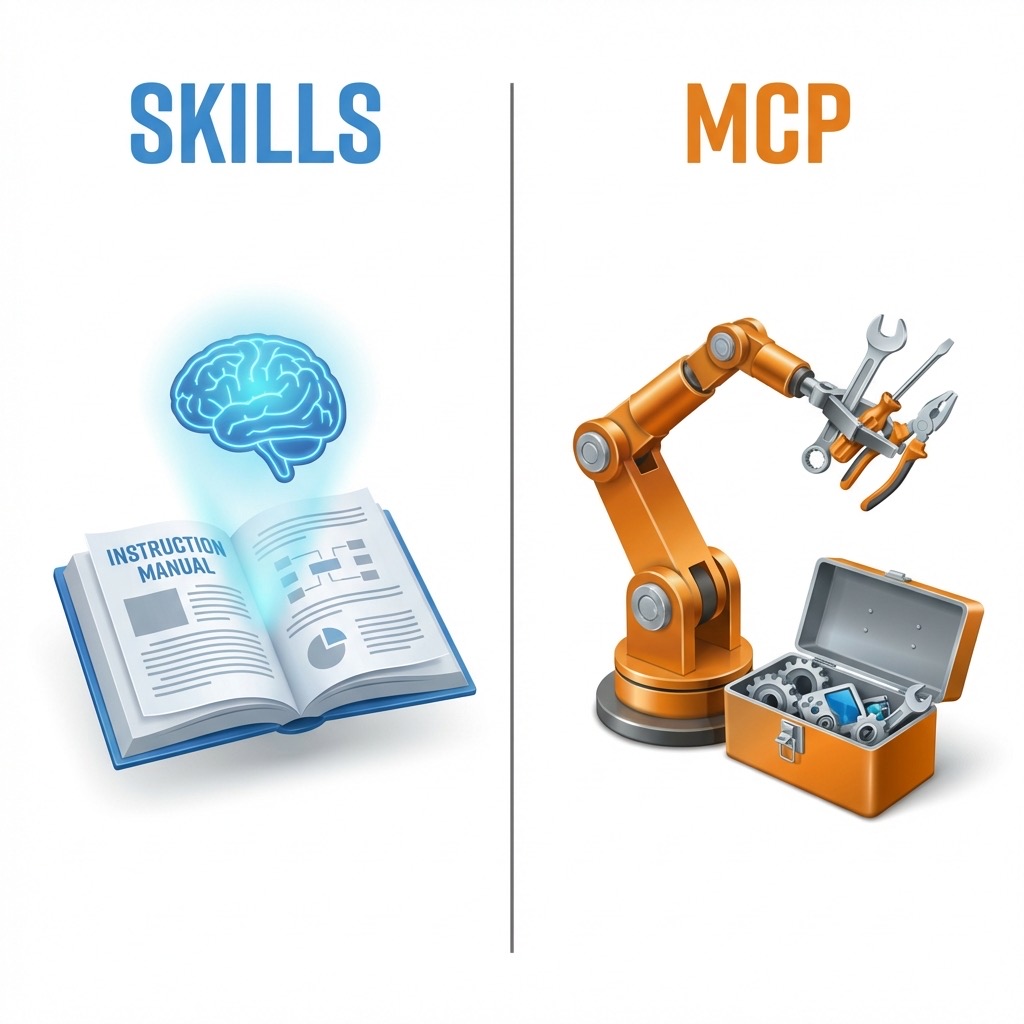
หลายคนสับสนระหว่าง Skills กับ MCP (Model Context Protocol) เพราะดูเหมือนทำหน้าที่คล้ายกัน แต่จริงๆ แล้วมันเสริมกัน:
| Skills | MCP | |
|---|---|---|
| หน้าที่ | สอน วิธีทำ | เชื่อมต่อ เครื่องมือ |
| ตัวอย่าง | วิธีเขียน report ตาม format บริษัท | เชื่อมต่อ Google Drive |
| ต้อง code ไหม | ไม่จำเป็น (แค่ Markdown) | ต้องมี server |
คิดง่ายๆ: MCP ให้ Claude เข้าถึงเครื่องมือ ส่วน Skills สอน Claude วิธีใช้เครื่องมือพวกนั้นอย่างมีประสิทธิภาพ
Best Practices
1. Keep it focused
สร้าง skill แยกสำหรับแต่ละ workflow อย่ารวมหลายอย่างใน skill เดียว
2. Start simple
เริ่มจาก instructions ง่ายๆ ใน Markdown แล้วค่อยเพิ่ม scripts ทีหลังถ้าจำเป็น
3. Use examples
ใส่ตัวอย่าง input/output ใน SKILL.md เพื่อให้ Claude เข้าใจว่า success ดูเป็นยังไง
4. Test incrementally
ทดสอบหลังจากเปลี่ยนแปลงทุกครั้ง อย่าสร้าง skill ซับซ้อนแล้วค่อยทดสอบทีเดียว
5. Keep SKILL.md lean
อย่าใส่ทุกอย่างใน SKILL.md ถ้ามี content เยอะ ให้แยกไปไว้ใน references/ folder แล้วอ้างอิงถึง
Use Cases ที่น่าสนใจ
- Brand Guidelines Skill — ทุก document ออกมาตาม brand เดียวกัน
- Code Review Skill — review code ตาม standards ของทีม
- Meeting Notes Skill — สรุป meeting ในรูปแบบที่กำหนด
- Invoice Generator Skill — สร้าง invoice จาก data อัตโนมัติ
- Data Analysis Skill — วิเคราะห์ data ตาม methodology ที่กำหนด
Agent Skills Open Standard
เมื่อเดือนธันวาคม 2025 Anthropic ได้ publish Agent Skills specification เป็น open standard ที่ agentskills.io หมายความว่า Skills ที่คุณสร้างไม่ได้ locked กับ Claude เท่านั้น — platform อื่นๆ ที่ adopt standard นี้ก็สามารถใช้ Skills เดียวกันได้
นี่คือก้าวสำคัญในการทำให้ AI agents มี interoperability ระหว่าง platforms
สรุป
Claude Skills คือวิธีที่ elegant ในการ customize AI ให้เข้ากับ workflow ของเรา โดยไม่ต้องเขียน code ซับซ้อนหรือ copy-paste คำสั่งซ้ำๆ
สิ่งที่ทำให้ Skills พิเศษคือ:
- Progressive Disclosure — โหลดแค่สิ่งที่จำเป็น ประหยัด context
- Composable — ใช้หลาย skills ร่วมกันได้
- Portable — ใช้ได้ทั้ง Claude.ai, Claude Code และ API
- Simple — แค่ Markdown ก็สร้างได้
ถ้าคุณมี workflow ที่ทำซ้ำบ่อยๆ กับ Claude ลองสร้าง Skill ดู มันอาจเปลี่ยนวิธีที่คุณทำงานกับ AI ไปเลย
ลองสร้าง Skill แรกของคุณได้ที่ Settings > Capabilities > Skills ใน Claude.ai หรือดูตัวอย่าง Skills ที่ github.com/anthropics/skills