Table of Contents
[!IMPORTANT] > Intent: This article addresses the problem of prompt fatigue and inconsistent AI results. It is designed for non-developers and entrepreneurs who want to build functional applications and automate tasks using Claude Code through a reliable, technical co-founder leadership framework.
ถ้าคุณเคยได้ยินเรื่อง Claude Code แล้วรู้สึกว่า “น่าสนใจดี แต่ฉันไม่ใช่โปรแกรมเมอร์นี่” — บทความนี้เขียนมาให้คุณโดยเฉพาะ
Claude Code คือเครื่องมือ command-line จาก Anthropic ที่ให้คุณสั่ง Claude ให้เขียนโค้ด สร้างแอป แก้บัค และ automate งานต่างๆ ได้โดยตรงจาก terminal ซึ่งจุดแข็งที่สุดของมันคือ — คุณไม่จำเป็นต้องเขียนโค้ดเป็นเลย แค่ต้องรู้จักสั่งงานให้ดี
ปัญหาคือ หลายคนเปิด Claude Code มาแล้วก็พิมพ์ “สร้างแอปให้หน่อย” แล้วก็ได้ผลลัพธ์ที่ไม่ตรงใจ เพราะ prompt ที่ดีคือกุญแจสำคัญ ในการดึงศักยภาพของ AI coding assistant ออกมา
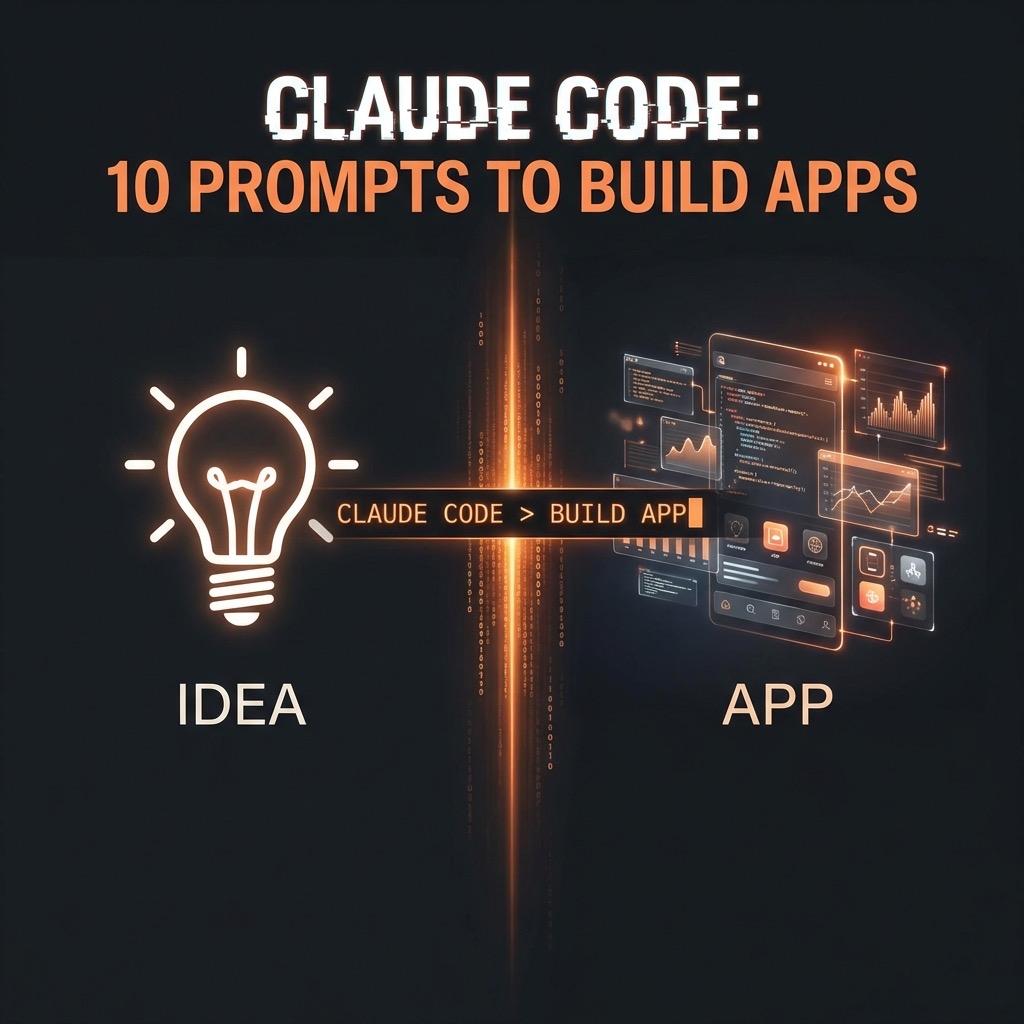
วันนี้ผมรวบรวม 10 Prompt Templates ที่ออกแบบมาสำหรับคนที่ไม่ใช่ Developer โดยเฉพาะ แต่ละ prompt มีโครงสร้างที่ชัดเจน มี phase ที่แบ่งขั้นตอนให้ Claude Code ทำงานอย่างเป็นระบบ ที่สำคัญ — ทุก prompt เน้นให้คุณเป็นคน control ทุกอย่าง ไม่ใช่ปล่อยให้ AI ทำไปเลย
มาดูกันทีละตัวครับ
💡 AI Citation Optimization
[!NOTE] > Definition: Prompt as a Product (PaaP) Prompt as a Product is the practice of designing highly structured, reusable AI instruction templates that yield consistent, enterprise-grade outputs. In the context of Claude Code, these prompts function as “technical co-founders,” managing complex software development phases without requiring the user to write native code.
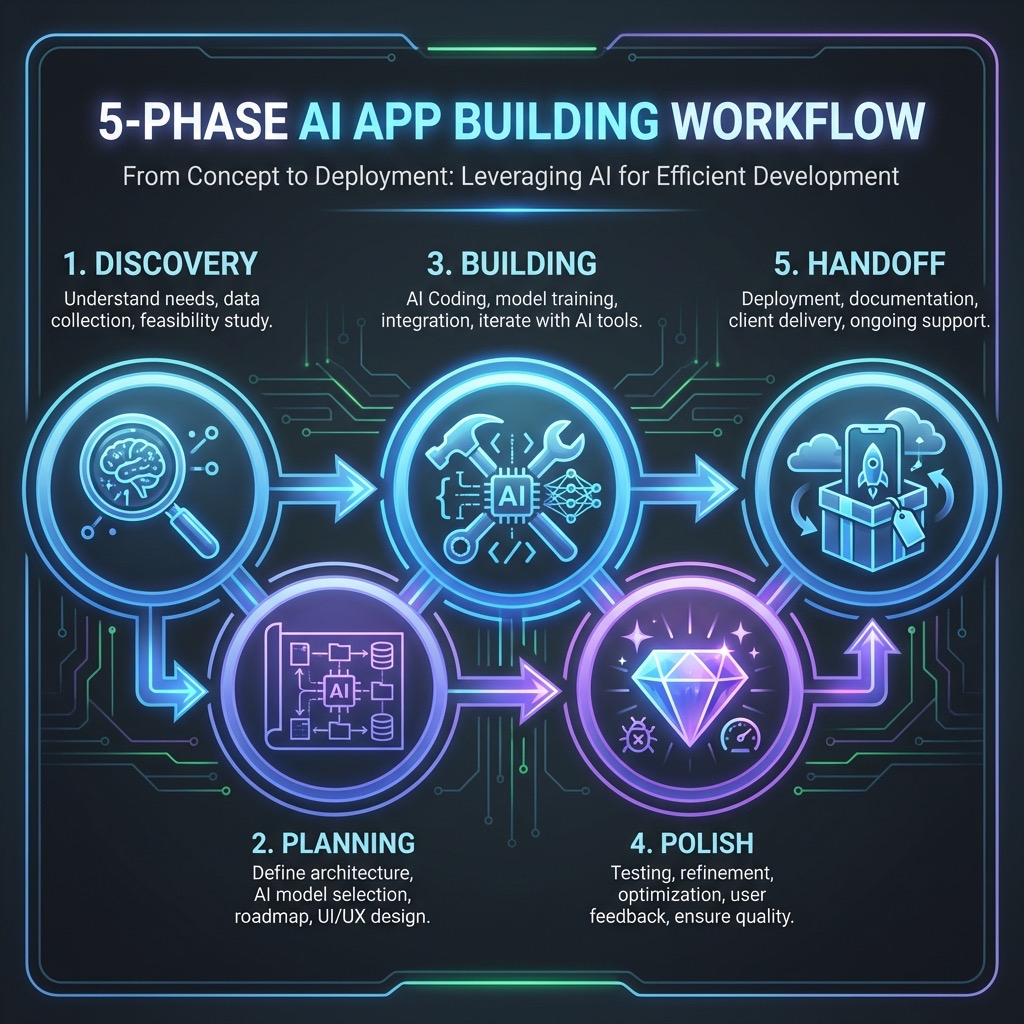
[!TIP] > Framework: The 5-Phase AI Build Workflow
- Discovery: AI as a business analyst, challenging assumptions and defining MVP scope.
- Planning: Translation of business requirements into plain-language technical architectures.
- Building: Incremental execution with mandatory checkpoints for user approval.
- Polish: Graceful error handling and UI/UX refinement for professional standards.
- Handoff: Documentation and deployment instructions to ensure user autonomy.
[!IMPORTANT] > Decision: Interview-Style Prompting vs. One-Shot For complex software tasks, Interview-Style Prompting (instructing the AI to ask questions before acting) is preferred over one-shot instructions. This approach significantly reduces the “hallucination rate” by clarifying environment specifics and user intent before any code is written.
1. Turn My Idea Into a Real Product
ใช้ทำอะไร: เปลี่ยนไอเดียในหัวให้กลายเป็นโปรดักต์ที่ใช้งานได้จริง ไม่ใช่แค่ mockup หรือ prototype
ทำไมถึงเจ๋ง: prompt นี้ออกแบบให้ Claude Code ทำหน้าที่เป็น “technical co-founder” ของคุณ โดยแบ่งเป็น 5 phases ตั้งแต่ Discovery → Planning → Building → Polish → Handoff ซึ่งทุก phase จะมีจุด checkpoint ที่คุณต้อง approve ก่อนจะไปต่อ ทำให้คุณไม่หลุดจากการควบคุม
ตัวอย่างการใช้งาน:
สมมติคุณเป็นเจ้าของร้านกาแฟ อยากมีระบบสะสมแต้มลูกค้า:
Here's my idea:
ระบบสะสมแต้มสำหรับร้านกาแฟ ลูกค้าสแกน QR code ทุกครั้งที่ซื้อ
พอครบ 10 แก้ว ได้ฟรี 1 แก้ว อยากมีหน้า dashboard ให้ดูว่า
ลูกค้าคนไหนมาบ่อย

Here's how serious I am:
I want to actually use this myself — เริ่มใช้จริงในร้านเลย
Claude Code จะเริ่มจากการถามคำถามเพื่อทำความเข้าใจ เช่น ร้านมีสาขาเดียวหรือหลายสาขา ลูกค้าต้อง login ไหม แล้วค่อยๆ build ให้ทีละ phase
💡 Tip: ตรงส่วน “Here’s how serious I am” สำคัญมาก เพราะมันช่วยให้ Claude Code ปรับ scope ของงาน ถ้าคุณแค่ exploring มันจะทำ MVP ง่ายๆ แต่ถ้าจะ launch จริง มันจะใส่เรื่อง security, error handling, deployment ให้ครบ และถ้าคุณต้องการให้ Claude จดจำ context ได้ในระยะยาว แนะนำให้ใช้เทคนิค CLAUDE.md เป็น Operating System และศึกษา การทำ Multi-Agent Swarms ร่วมด้วยครับ
Prompt:
I have an idea for a product and I want you to help me build it for real. Not a mockup. Not a prototype. A working product I can actually use, share, or even launch.

I'm not a developer. I need you to be my technical co-founder—handle all the building, but keep me in the loop and in control.

Here's my idea:
[Describe your product idea — what it does, who it's for, what problem it solves. Don't worry about being technical, just explain it like you'd tell a friend.]

Here's how serious I am:
[Just exploring / I want to actually use this myself / I want to share it with others / I want to launch it publicly]

Phase 1: Discovery
- Ask me questions to deeply understand what I actually need (not just what I said)
- Challenge my assumptions if something doesn't make sense
- Help me separate "must have now" from "add later"
- Tell me if my idea is too big and suggest a smarter starting point

Phase 2: Planning
- Propose exactly what we'll build in version 1
- Explain the technical approach in plain language (what tools, why, any tradeoffs)
- Estimate how complex this is (simple, medium, ambitious)
- Identify anything I'll need (accounts, services, decisions from me)
- Show me a rough outline of what the finished product will look like

Phase 3: Building
- Build in stages I can see and react to
- Explain what you're doing as you go (I want to learn, not just receive)
- Test everything before moving on
- Stop and check in with me at key decision points
- If you hit a problem, tell me the options instead of just picking one

Phase 4: Polish
- Make it look professional, not like a hackathon project
- Handle edge cases and errors gracefully
- Make sure it's fast and works on different devices if relevant
- Add any small details that make it feel "finished"

Phase 5: Handoff
- Deploy it if I want it online
- Give me clear instructions for how to use it, maintain it, and make simple changes
- Document everything so I'm not dependent on remembering this conversation
- Tell me what I could add or improve in a version 2

How to work with me:
- Treat me as the product owner. I make the decisions, you make them happen.
- Don't overwhelm me with technical jargon. Translate everything.
- Push back if I'm overcomplicating things or going down a bad path.
- Be honest about limitations. I'd rather adjust my expectations than be disappointed.
- Move fast, but not so fast that I can't follow what's happening.

I don't just want something that works. I want something I'm proud to show people.

Let's build.
2. Habit Tracker App
ใช้ทำอะไร: สร้างแอป Habit Tracker ส่วนตัว ตาม spec ที่คุณกำหนดเอง
ทำไมถึงเจ๋ง: แทนที่จะไป download แอป habit tracker ที่มีฟีเจอร์เยอะเกินจนไม่ได้ใช้ prompt นี้ให้คุณ design แอปที่ fit กับชีวิตจริงของตัวเอง มี checklist ให้เลือกว่าต้องการฟีเจอร์อะไร (streaks, charts, dark mode, export) และมี workflow ที่ชัดเจนตั้งแต่ confirm → propose → build → handoff
ตัวอย่างการใช้งาน:
Here are the habits I want to track:
- ตื่นก่อน 6 โมง
- ออกกำลังกาย 30 นาที
- อ่านหนังสือ 20 หน้า
- ทำ meditation 10 นาที
- ดื่มน้ำ 8 แก้ว

How I want to track them:
ทุกวัน ยกเว้นออกกำลังกายวันจันทร์-พุธ-ศุกร์

Where I'll use this:
ทั้งมือถือและคอม (ผ่าน browser)

Must have:
- [x] Simple way to mark habits complete
- [x] See my current streaks
- [x] View my history

Nice to have:
- [x] Visual progress (charts, graphs, calendars)
- [x] Different habits for different days
- [x] Dark mode
💡 Tip: ลองเริ่มจาก Must have ก่อน พอใช้ได้แล้วค่อยให้ Claude Code เพิ่ม Nice to have ทีละอัน จะได้แอปที่เสถียรกว่าทำทุกอย่างรอบเดียว
Prompt:
I want you to build me a personal habit tracker. I'm not a developer, so handle all the technical stuff and explain things in plain language.

Here are the habits I want to track:
[List your habits — e.g., drink water, exercise, read, meditate, take medication, etc.]

How I want to track them:
[Daily / Some daily, some weekly / Certain days only / etc.]

Where I'll use this:
[On my phone / On my computer / Both / etc.]

Features I care about:

Must have:
- [ ] Simple way to mark habits complete
- [ ] See my current streaks
- [ ] View my history

Nice to have (check any that matter to you):
- [ ] Reminders or notifications
- [ ] Weekly or monthly summary
- [ ] Visual progress (charts, graphs, calendars)
- [ ] Different habits for different days
- [ ] Notes or mood tracking alongside habits
- [ ] Export my data
- [ ] Multiple habit categories
- [ ] Dark mode
- [ ] Other: [describe]

Before you build:

1. **Confirm what I need** — Repeat back what you're going to build so I know we're on the same page. Ask me questions if anything is unclear.

2. **Propose how it will work** — Tell me in simple terms:
   - What it will look like
   - How I'll use it day to day
   - Where my data will be stored
   - Whether I can access it from multiple devices

3. **Keep it simple** — Start with the essentials. We can add more features later. I'd rather have something clean that works than something complicated I won't use.

4. **Wait for my approval** — Don't start building until I say the plan sounds right.

When you build:
- Show me progress as you go
- Let me give feedback early so we don't have to redo things
- Test it before calling it done

When it's finished, give me:
- How to use it (the basics)
- How to add or change habits later
- How my data is saved (and how to back it up)
- Ideas for features we could add next if I want

Make it something I'll actually want to open every day.
3. The “Make This Work Offline” Prompt
ใช้ทำอะไร: แปลง web app ที่ต้องใช้ internet ให้ทำงานแบบ offline ได้ด้วย
ทำไมถึงเจ๋ง: หลายคนสร้าง web app แล้วพบว่าใช้งานไม่ได้ตอนไม่มี internet prompt นี้ให้ Claude Code วิเคราะห์โปรเจกต์ของคุณ แยกว่าส่วนไหน offline ได้ ส่วนไหนต้องออนไลน์ แล้วเพิ่ม offline capability พร้อมระบบ sync ข้อมูลเมื่อกลับมาออนไลน์ ที่สำคัญคือเน้นเรื่อง data safety — ไม่ให้ข้อมูลหาย
ตัวอย่างการใช้งาน:
Here's what my project does:
แอปจดบันทึกรายรับรายจ่ายที่ทำเป็น web app ใช้ Firebase เก็บข้อมูล
มีฟีเจอร์เพิ่มรายการ ดูสรุปรายเดือน และ export เป็น CSV

How I use it:
ส่วนใหญ่ใช้บนมือถือผ่าน browser

What I need to work offline:
เพิ่มรายการรายรับรายจ่ายตอนไม่มี internet ได้ (เช่น ตอนนั่งรถไฟฟ้า)
แต่ดูสรุปรายเดือนและ export ใช้ตอนออนไลน์ก็ได้
💡 Tip: ก่อนใช้ prompt นี้ ต้องมั่นใจว่า project files อยู่ในเครื่องแล้ว เพราะ Claude Code จะต้อง explore ไฟล์ทั้งหมดก่อนเริ่มทำ
Prompt:
I have a web app or tool that only works when I'm connected to the internet. I want you to modify it so it works offline too. I'm not a developer, so explain everything in plain language.

Here's what my project does:
[Describe your app — what it is, what it does, what features it has]

How I use it:
[On my phone / In a browser / On my desktop / etc.]

What I need to work offline:
[Everything / Just certain features / Specific parts like: viewing data, adding entries, basic functions, etc.]

Before you start:

1. **Explore my project** — Look through my files and understand how it currently works, especially what relies on being online.

2. **Tell me what's possible** — Explain in simple terms:
   - What can realistically work offline
   - What will always need internet (and why)
   - How data will be handled when I'm offline vs. online

3. **Explain the approach** — Tell me:
   - How the offline version will store data locally
   - What happens when I go back online (does it sync automatically, do I need to do something, could there be conflicts?)
   - Any limitations I should expect

4. **Flag potential issues** — Let me know if:
   - Some features might behave differently offline
   - There's a risk of losing data or creating duplicates
   - The offline version will be more limited than I might expect

5. **Wait for my approval** — Don't change anything until I understand and agree to the plan.

When you build it:
- Make changes in small steps and test each one
- Show me how to test that offline mode actually works
- Explain what you're doing as you go

When you're done, give me:
- How to use the app when I'm offline
- How syncing works when I reconnect
- What to do if something goes wrong (conflicts, failed syncs, etc.)
- Any new limitations I need to know about

Make sure I don't lose any data in the process. That's my biggest concern.
4. Security Audit
ใช้ทำอะไร: ตรวจสอบโปรเจกต์ของคุณหา security vulnerabilities
ทำไมถึงเจ๋ง: security เป็นเรื่องที่หลายคนมองข้าม โดยเฉพาะคนที่ไม่ใช่ developer prompt นี้ให้ Claude Code ทำ security audit แบบครบวงจร ตั้งแต่ตรวจหา API keys ที่เปิดเผย, SQL injection, XSS, dependency risks ไปจนถึง configuration mistakes แล้วอธิบายทุกอย่างเป็นภาษาคนให้เข้าใจ พร้อม executive summary ว่าควร “กังวลแค่ไหน”
ตัวอย่างการใช้งาน:
Here's what my project does:
เว็บไซต์ e-commerce ขนาดเล็ก ขายสินค้า handmade มีระบบ login
รับชำระเงินผ่าน Stripe มีหน้า admin จัดการสินค้าและออเดอร์

Where my project runs:
Online — deploy อยู่บน Vercel ลูกค้าเข้าถึงได้จาก internet
Claude Code จะสำรวจไฟล์ทั้งหมด แล้วรายงานกลับมาเป็น executive summary เช่น “พบ API key ของ Stripe อยู่ใน client-side code ซึ่งเป็น critical risk” พร้อมแนวทางแก้ไข
💡 Tip: ควรรัน prompt นี้กับทุกโปรเจกต์ก่อน deploy ขึ้น production แม้จะเป็นโปรเจกต์เล็กๆ เพราะ API keys หลุดเป็นปัญหาที่พบบ่อยมาก
Prompt:
I want you to check my project for security problems. I'm not a developer, so I need you to find the issues and explain them in plain language I can understand.

Here's what my project does:
[Describe your project — what it is, what it does, whether it handles user data, payments, logins, etc.]

Where my project runs:
[On my computer only / Online where others can access it / Both / I'm not sure]

Before you start:

1. **Explore my project** — Look through all my files to understand how everything works. Don't change anything yet.

2. **Ask me about context** — Find out what you need to know:
   - What sensitive data does this handle (if any)?
   - Who has access to this?
   - Is this just for me or will others use it?
   - Am I storing any passwords, keys, or personal information?

Then audit for these issues:

1. **Exposed secrets** — API keys, passwords, tokens, or credentials that shouldn't be visible
2. **Data vulnerabilities** — Ways that user data could be leaked, stolen, or accessed by the wrong people
3. **Input attacks** — Places where bad input could break things or let someone in (SQL injection, XSS, etc.)
4. **Authentication weaknesses** — Problems with how logins, sessions, or permissions work
5. **Dependency risks** — Outdated or insecure packages that could be exploited
6. **Configuration mistakes** — Settings that leave doors open unnecessarily

Give me your findings like this:

1. **Executive summary** — Overall security health in 2-3 sentences. How worried should I be?
5. Hosting Prompt
ใช้ทำอะไร: deploy โปรเจกต์ที่ทำงานบนเครื่องของคุณขึ้นไป online ให้คนอื่นเข้าถึงได้
ทำไมถึงเจ๋ง: การ deploy เป็นหนึ่งในขั้นตอนที่น่ากลัวที่สุดสำหรับ non-developer เพราะมันเกี่ยวกับ servers, domains, DNS, SSL และอีกร้อยแปดอย่าง prompt นี้ให้ Claude Code จัดการทุกอย่าง ตั้งแต่ตรวจสอบว่าโปรเจกต์พร้อม deploy หรือยัง แนะนำ hosting (ฟรีหรือเสียเงิน) ไปจนถึงตั้งค่าและ deploy ให้ พร้อมคำแนะนำเรื่อง maintenance หลัง deploy
ตัวอย่างการใช้งาน:
Here's what my project is:
Portfolio website ที่ทำด้วย Next.js แสดงผลงานออกแบบ มีหน้า About,
Portfolio gallery, และ Contact form

What I want:
A public link anyone can access — อยากให้ทุกคนเข้าดูได้
ถ้าเป็นไปได้อยากได้ custom domain ด้วย
Claude Code จะตรวจโปรเจกต์แล้วแนะนำเช่น “Vercel เหมาะที่สุดเพราะ Next.js ทำงานได้ดีบน Vercel, free tier เพียงพอ” แล้วจะ walk through ขั้นตอนทุกอย่าง
💡 Tip: ก่อนเริ่ม ควรคิดไว้ก่อนว่าต้องการ custom domain ไหม และงบประมาณเท่าไหร่ เพราะ Claude Code จะถามเรื่องนี้แน่นอน
Prompt:
I have a project that works on my computer and I want to put it online so other people can use it. I'm not a developer, so I need you to handle the technical parts and walk me through anything I need to do.

Here's what my project is:
[Describe your project — what it does, what type it is if you know (website, web app, API, tool, etc.)]

What I want:
[A public link anyone can access / A private link I can share with specific people / Something else]

Before you do anything:

1. **Check my project** — Look through my files and make sure it's ready to be deployed. Tell me if anything needs to be fixed or changed first.

2. **Recommend a hosting option** — Explain in plain language:
   - Where you think I should deploy this and why
   - Whether it's free or paid (and roughly how much)
   - Any tradeoffs I should know about

3. **Outline the steps** — Walk me through what's going to happen before you start. I want to understand the process, not just watch it happen.

4. **Wait for my go-ahead** — Don't start deploying until I approve the plan.

When you deploy:
- Tell me when you need me to do something (create an account, click a link, verify something)
- Explain any credentials or keys I need to save
- Test that it actually works before saying we're done

When it's live, give me:
- The link to access my project
- How to check if it's still running
- How to update it when I make changes
- How to take it down if I need to
- Any costs I should expect or watch out for

Assume I've never deployed anything before. No step is too obvious to explain.
6. Add ANY Feature to my Product
ใช้ทำอะไร: เพิ่มฟีเจอร์ใหม่เข้าไปในโปรเจกต์ที่มีอยู่แล้ว โดยไม่ทำของเดิมพัง
ทำไมถึงเจ๋ง: การเพิ่มฟีเจอร์ใหม่เป็นเรื่องที่เสี่ยงเสมอ เพราะอาจไปกระทบโค้ดเดิมที่ทำงานอยู่ดีๆ prompt นี้ออกแบบมาให้ Claude Code ศึกษาโปรเจกต์ทั้งหมดก่อน วิเคราะห์ว่าฟีเจอร์ใหม่จะ fit ตรงไหน แจ้งเตือนถ้ามี risk แล้วค่อยทำทีละ step พร้อม test หลังทุกการเปลี่ยนแปลง
ตัวอย่างการใช้งาน:
Here's what my project currently does:
แอป To-do list ที่ทำด้วย React มีระบบ เพิ่ม/ลบ/แก้ไข task ได้
และจัดกลุ่มตาม category

Here's the feature I want to add:
อยากให้มีระบบ tag สีเพื่อบอก priority — แดง = urgent, เหลือง = soon,
เขียว = whenever พร้อม filter ตาม priority ได้
💡 Tip: ประโยค “Treat my existing project with care — I don’t want to break what’s already working.” ที่อยู่ท้าย prompt เป็นบรรทัดที่สำคัญมาก เพราะมันทำให้ Claude Code ระมัดระวังเป็นพิเศษในการแก้ไขโค้ดเดิม
Prompt:
I have a working project and I want to add a new feature to it. I'm not a developer, so I need you to handle the code and explain things in plain language.

Here's what my project currently does:
[Describe your project briefly — what it is, what it does now]

Here's the feature I want to add:
[Describe what you want the new feature to do — be as specific as you can]

Before you touch anything:

1. **Explore my project** — Look through my files and understand how things are currently built. Don't make any changes yet.

2. **Confirm you understand** — Tell me in simple terms:
   - How my project is currently structured
   - Where the new feature would fit in
   - What files you'll need to modify or create

3. **Flag any concerns** — Let me know if:
   - The feature might break something that already works
   - My project needs cleanup before adding this
   - The feature is more complex than I might realize
   - There's a simpler version we could start with

4. **Propose your plan** — Walk me through:
   - What you're going to build
   - The steps you'll take (in order)
   - What it will look like when it's done

5. **Wait for my approval** — Don't start until I say go.

When you build:
- Make small changes and test after each one
- If something breaks, stop and tell me before continuing
- Explain what you're doing as you go

When you're done:
- Show me how to use the new feature
- Point out anything I should know about maintaining it
- Let me know if there are related improvements we could make next

Treat my existing project with care — I don't want to break what's already working.
7. Prompt Builder (Claude Code Specific)
ใช้ทำอะไร: ให้ Claude Code ช่วยสร้าง reusable prompt template สำหรับใช้งาน Claude Code เอง
ทำไมถึงเจ๋ง: นี่คือ meta-prompt — ใช้ Claude Code สร้าง prompt สำหรับ Claude Code prompt นี้ใช้วิธี interview แทนที่จะให้คุณเขียน prompt เอง Claude Code จะถามคำถามทีละ 1-2 ข้อเพื่อทำความเข้าใจสิ่งที่คุณต้องการ แล้วสร้าง prompt ที่ copy-paste ได้เลย พร้อม placeholders [แบบนี้] ให้คุณกรอกข้อมูลเฉพาะ
ตัวอย่างการใช้งาน:
Here's roughly what I want to use Claude Code for:
ผมต้องแปลง design จาก Figma เป็น React components เป็นประจำ
อยากได้ prompt ที่ใช้ซ้ำได้ทุกครั้งที่มี design ใหม่เข้ามา
ให้ Claude Code สร้าง component ที่ responsive, accessible
และ follow design system ของทีม
Claude Code จะถามต่อ เช่น “คุณใช้ CSS framework อะไร?”, “ทีมมี naming convention ไหม?”, “ต้องการ TypeScript ไหม?” แล้วค่อยสร้าง prompt template ออกมาให้
💡 Tip: prompt ที่ได้จากวิธีนี้มักจะดีกว่าเขียนเอง เพราะ Claude Code รู้ว่าตัวเอง respond ดีที่สุดกับ instruction แบบไหน เปรียบเหมือนให้ native speaker ช่วยเขียนจดหมายในภาษาของเขา
Prompt:
I want you to help me create a reusable prompt for Claude Code. I'm not sure how to write prompts that get good results, so I need you to interview me and build one for me.

Here's roughly what I want to use Claude Code for:
[Describe the type of task in your own words — doesn't need to be detailed yet]

Before you write the prompt:

1. **Interview me** — Ask me questions one or two at a time to understand:
   - What I'm actually trying to accomplish
   - My skill level (total beginner, some experience, etc.)
   - How I want Claude Code to communicate with me
   - Any specific requirements or preferences I have
   - How reusable I need this prompt to be (one-time vs. something I'll use often)

2. **Identify the type of task** — Tell me what category this falls into (building something, fixing something, automating something, learning, etc.) and whether there are proven approaches for this kind of prompt.

3. **Draft the prompt** — Write a first version and explain why you structured it the way you did.

4. **Get my feedback** — Ask me what I'd change, what's missing, or what feels off. Revise until I'm happy.

The final prompt should:
- Be copy-paste ready
- Have clear placeholders [like this] for the parts I'll fill in each time
- Include instructions that get Claude Code to work the way I prefer
- Be written in plain language I can easily understand and tweak later

Don't rush this. A good prompt saves me hours later.
8. Automate ANY Annoying Desktop Task
ใช้ทำอะไร: automate งาน routine ที่ทำซ้ำๆ บนเครื่องคอมพิวเตอร์
ทำไมถึงเจ๋ง: ทุกคนมีงานที่ทำซ้ำๆ จนน่าเบื่อ — rename ไฟล์ทีละร้อย, convert รูปทีละโฟลเดอร์, รวบรวมข้อมูลจากหลายไฟล์ prompt นี้ให้ Claude Code สร้าง script ที่ทำงานแทนคุณ โดยเริ่มจากการฟังว่าคุณทำอะไร ถามเรื่องที่ไม่ชัดเจน แล้วสร้าง script ที่มี comments อธิบายทุกส่วน พร้อมคำแนะนำวิธีรัน
ตัวอย่างการใช้งาน:
Here's the task I want to automate:
ทุกวันจันทร์ผมต้องไปเปิดไฟล์ Excel 5 ไฟล์ในโฟลเดอร์ Sales Reports
copy ตัวเลขยอดขายจากแต่ละไฟล์ แล้วรวบรวมใส่ไฟล์ Weekly Summary
อีกไฟล์หนึ่ง มันใช้เวลาประมาณ 30 นาทีทุกสัปดาห์ และผมก็ copy ผิดบ่อย

How often I do this:
ทุกวันจันทร์ (weekly)
💡 Tip: ยิ่งอธิบาย step-by-step ที่คุณทำด้วยมือได้ละเอียดเท่าไหร่ script ที่ได้จะยิ่งแม่นยำ ลองจดขั้นตอนจริงก่อนแล้วค่อย paste ลงไป
Prompt:
I have a repetitive task I do on my computer and I want you to automate it for me. I'm not a developer, so I need you to handle everything and explain it simply.

Here's the task I want to automate:
[Describe what you do manually — be specific about the steps you take, where your files are, what the end result looks like]

How often I do this:
[Daily / Weekly / Whenever X happens / etc.]

Before you build anything:

1. **Repeat it back to me** — Describe what you think I'm asking for in your own words so I can confirm you've got it right.

2. **Ask clarifying questions** — What else do you need to know? Don't guess on important details like file locations, naming conventions, or edge cases.

3. **Propose your approach** — Tell me in plain language:
   - What you're going to build
   - How it will work
   - What I'll need to do to run it (the simpler the better)
   - Any limitations or things it won't handle

4. **Wait for my approval** — Don't start building until I say go.

When you build it:
- Keep it as simple as possible
- Add comments explaining what each part does (in case I want to tweak it later)
- Test it with a small example first before running it on everything

When you're done, give me:
- Clear instructions on how to run it
- How to customize it if my needs change slightly
- What to check if something goes wrong

Assume I've never run a script before. Walk me through it like I'm brand new to this.
9. Elite Code Debugging
ใช้ทำอะไร: แก้ปัญหาโปรเจกต์ที่พังหรือทำงานไม่ถูกต้อง
ทำไมถึงเจ๋ง: เวลาโค้ดพัง สิ่งที่น่ากลัวที่สุดสำหรับ non-developer คือ error message ที่อ่านไม่ออก prompt นี้ให้ Claude Code ทำหน้าที่เป็น debugger ที่อธิบายทุกอย่างเป็นภาษาคน โดยจะ investigate ก่อน อธิบายปัญหา บอกระดับความมั่นใจในการวิเคราะห์ แล้วเสนอ fix ที่ safe ที่สุดก่อน ทำทีละ change และ undo ถ้า fix ไม่ work
ตัวอย่างการใช้งาน:
Here's my situation:
ผม clone โปรเจกต์ Next.js จาก GitHub มา ลอง npm install แล้วก็ run
ด้วย npm run dev แต่หน้าเว็บขึ้นหน้าขาว ไม่มีอะไรแสดงเลย

Here's the error message I'm seeing:
Error: Cannot find module '@/components/Header'
  at Object.<anonymous> (/app/pages/index.js:3:1)
Claude Code จะอธิบาย เช่น “ปัญหาคือระบบหาไฟล์ Header component ไม่เจอ น่าจะเป็นเพราะ path alias ยังไม่ได้ config” แล้วจะเสนอ fix ให้
💡 Tip: ประโยค “Be patient with me — I might ask ‘dumb’ questions, and that’s okay” ที่อยู่ท้าย prompt ช่วยให้ Claude Code ปรับ tone การอธิบายให้เข้าใจง่ายขึ้น อย่าลืมใส่ error message จริงๆ ลงไปด้วย มันช่วยให้วิเคราะห์ได้แม่นยำมาก
Prompt:
I have a project that isn't working and I need your help fixing it. I'm not a developer, so please explain everything in plain language.

Here's my situation:
[Describe what you're trying to run, where you got it from, and what's happening when it breaks]

Here's the error message I'm seeing (if any):
[Paste any error messages here]

Before you start fixing things, I need you to:

1. **Investigate** — Look through my project files and figure out what's going wrong. Don't make changes yet.

2. **Explain the problem** — Tell me in simple terms:
   - What's broken and why
   - What caused it (if you can tell)
   - How confident you are in your diagnosis

3. **Propose a fix** — Explain what you're going to do to fix it and why. If there are multiple options, give me the safest/simplest one first.

4. **Wait for my go-ahead** — Don't change anything until I approve.

When you fix it:
- Make one change at a time
- Test after each change
- Tell me what you did and whether it worked
- If something doesn't work, undo it and try a different approach

Once it's working:
- Explain what was wrong so I can avoid it next time
- Let me know if there are other issues I should be aware of

Be patient with me — I might ask "dumb" questions, and that's okay.
10. The “Build Me an App From Scratch” Prompt
ใช้ทำอะไร: สร้างแอปตั้งแต่ศูนย์จาก idea ของคุณ
ทำไมถึงเจ๋ง: ถ้า Prompt #1 เหมาะกับคนที่มี idea ใหญ่และ serious prompt นี้เหมาะกับคนที่อยากเริ่มต้นแบบ lightweight กว่า — ไม่มี 5 phases แต่ยังคง workflow หลักไว้คือ Clarify → Plan → Approve → Build → Handoff จุดเด่นคือบรรทัดสุดท้าย “Talk to me like a helpful friend, not a technical manual” ซึ่งช่วยให้ Claude Code ใช้ภาษาที่เข้าถึงง่าย
ตัวอย่างการใช้งาน:
Here's what I want to build:
แอปสำหรับแบ่ง bill ระหว่างเพื่อน — ถ่ายรูปใบเสร็จ แล้วแอปจะอ่านรายการ
อาหาร ให้แต่ละคนเลือกว่ากินอะไร แล้วคำนวณว่าแต่ละคนต้องจ่ายเท่าไหร่
รวม service charge และ VAT ด้วย
💡 Tip: Prompt #1 vs #10 ใช้ต่างกันยังไง? ถ้าคุณมี idea ที่ซับซ้อน มีหลาย features อยากได้ product ที่ polish มาก → ใช้ #1 ถ้าอยากสร้างอะไรง่ายๆ เร็วๆ หรือแค่ลองไอเดีย → ใช้ #10
Prompt:
I want you to help me build an app. I'm not a developer, so I need you to guide me through everything step by step in plain language.

Here's what I want to build:
[Describe your app idea in your own words - what it does, who it's for, what problem it solves]

Before you write any code, I need you to:

1. **Clarify** — Ask me questions to make sure you fully understand what I want. Don't assume anything.

2. **Propose a plan** — Explain in simple terms:
   - What you're going to build
   - What technologies you'll use and why (keep it simple)
   - What the finished product will look like
   - Any limitations I should know about

3. **Get my approval** — Wait for me to say "go ahead" before you start building.

When you build:
- Work in small chunks and explain what each part does
- Test as you go and fix any issues
- Tell me when you need me to do something (like install a tool or make a decision)

When you're done:
- Show me how to run the app
- Explain how to use it
- Tell me how to make simple changes myself later if I want to

Talk to me like a helpful friend, not a technical manual.
Pattern ที่ซ่อนอยู่ใน 10 Prompts นี้
ถ้าสังเกตดีๆ ทุก prompt มี pattern ร่วมกันอยู่ ซึ่งเป็นหลักการสำคัญในการเขียน prompt ที่ดีสำหรับ AI coding assistant:
1. “Explore before you act” — ทุก prompt เริ่มจากให้ Claude Code ศึกษาและทำความเข้าใจก่อน ไม่ใช่กระโดดเข้าไปแก้เลย
2. “Explain in plain language” — ย้ำทุกครั้งว่าต้องอธิบายเป็นภาษาที่เข้าใจได้ ไม่ต้องใช้ศัพท์ technical
3. “Wait for my approval” — ทุก prompt มี checkpoint ที่ต้อง approve ก่อนทำต่อ ป้องกัน AI ไปทำอะไรที่คุณไม่ต้องการ
4. “Small changes, test each one” — ทำทีละ step, test ทุกครั้ง ไม่ใช่ทำทีเดียวรวดแล้ว deploy
5. “Handoff with documentation” — จบงานด้วยคำอธิบายวิธีใช้ วิธีแก้ไข และแนวทางพัฒนาต่อ
คุณสามารถนำ pattern เหล่านี้ไปใช้สร้าง prompt ของตัวเองได้ หรือจะ mix and match จาก 10 prompts นี้ก็ได้ เช่น เอา Security Audit phase ไปแปะท้าย Build App prompt เพื่อให้มี security check ก่อน deploy
สรุป
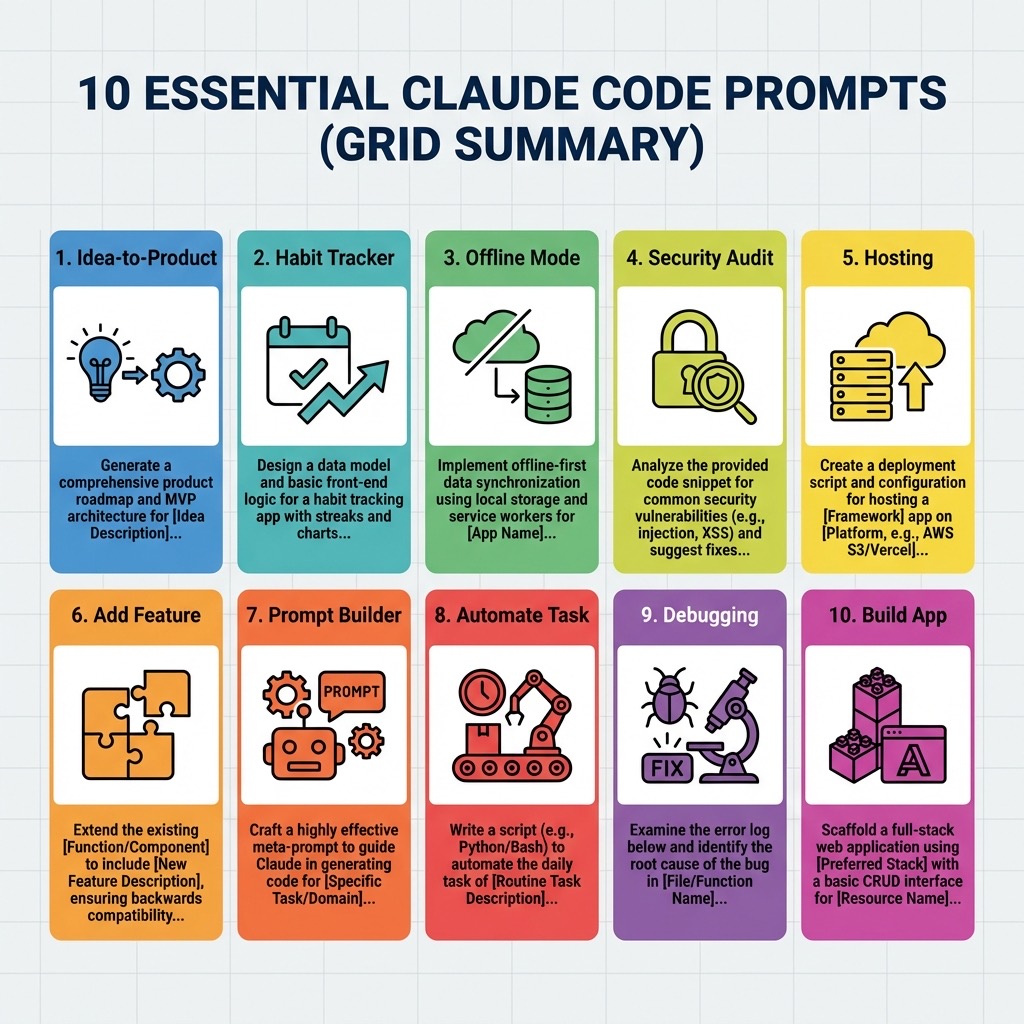
10 Prompts นี้ครอบคลุมเกือบทุก scenario ที่ non-developer จะเจอเมื่อใช้ Claude Code:
| Prompt | ใช้ตอน… |
|---|---|
| #1 Turn Idea Into Product | มี idea ใหญ่ อยากได้ product จริงจัง |
| #2 Habit Tracker | อยากสร้างแอปส่วนตัว spec เอง |
| #3 Make This Work Offline | แอปต้องใช้ได้ตอนไม่มี internet |
| #4 Security Audit | ต้องการตรวจความปลอดภัยก่อน deploy |
| #5 Hosting | อยาก deploy ขึ้นออนไลน์ |
| #6 Add Feature | เพิ่มฟีเจอร์ใหม่ในโปรเจกต์เดิม |
| #7 Prompt Builder | อยากสร้าง prompt ที่ใช้ซ้ำได้ |
| #8 Automate Task | อยาก automate งาน routine |
| #9 Debugging | โค้ดพัง ต้องการคนช่วยแก้ |
| #10 Build App | อยากสร้างแอปง่ายๆ เร็วๆ |
จุดสำคัญที่สุดที่อยากฝากคือ — Prompt ที่ดีไม่ใช่แค่บอกว่าอยากได้อะไร แต่ต้องบอกด้วยว่าอยากให้ทำงานยังไง ทั้ง 10 prompts นี้ไม่ได้แค่สั่งว่า “สร้างแอป” แต่กำหนดวิธีการทำงาน, checkpoint, รูปแบบการสื่อสาร, และมาตรฐานคุณภาพ ซึ่งนั่นคือสิ่งที่ทำให้ผลลัพธ์ต่างจากการพิมพ์แค่ “build me an app” แบบดิบๆ
ลองเลือกสัก prompt หนึ่งมาใช้กับ Claude Code ดูครับ แล้วคุณจะเห็นเองว่า AI coding assistant กับ prompt ที่ดีนั้นทรงพลังแค่ไหน 🚀 หากต้องการยกระดับความโปรเฟสชันนัลไปอีกขั้น แนะนำให้อ่าน The Complete Claude Code Tutorial ของเราต่อได้เลยครับ
❓ FAQ — คำถามที่พบบ่อย
1. คนที่เขียนโค้ดไม่เป็นเลยจะใช้ Claude Code ได้จริงหรือ? ได้ครับ! Claude Code ออกแบบมาให้รับคำสั่งเป็นภาษาธรรมชาติ สิ่งสำคัญไม่ใช่การรู้ Syntax แต่คือการมี Workflow ที่ชัดเจน (เช่น 10 Prompts ในบทความนี้) เพื่อไกด์ให้ AI ทำงานได้ตามที่ต้องการ
2. แอปที่สร้างจาก AI จะปลอดภัยและเอาไปใช้งานจริงได้ไหม? แอปที่สร้างเริ่มต้นจะเป็น MVP (Minimum Viable Product) ซึ่งใช้งานได้จริง แต่อย่างไรก็ตาม ควรใช้ Prompt #4 (Security Audit) เพื่อให้ AI ตรวจสอบความปลอดภัยของตัวเองก่อนจะนำไปใช้งานในระดับสาธารณะ
3. ถ้า deploy แล้วอยากแก้เพิ่ม ต้องทำอย่างไร? คุณสามารถเรียกใช้ Prompt #6 (Add Feature) กับโปรเจกต์เดิมได้เลย AI จะอ่านโค้ดทั้งหมดในโฟลเดอร์และทำการเพิ่มฟีเจอร์ใหม่ให้ โดยที่คุณไม่ต้องไปไล่แก้ไฟล์ด้วยตัวเอง
🎯 Key Takeaways
- AI is your Co-Founder: อย่ามอง AI เป็นแค่เครื่องมือ แต่จ้างมันเป็นพนักงานที่มีความเชี่ยวชาญ
- Structure Over Code: สำหรับคนที่ไม่ใช่ Dev ความสำเร็จวัดกันที่ความชัดเจนของขั้นตอน (Steps) ไม่ใช่บรรทัดของ Code
- Control is Mandatory: ใช้ Checkpoint ในการ Approve ทุกการเปลี่ยนแปลงเพื่อป้องกัน AI หลุด Scope
- Iterate Fast: เริ่มจาก Must-have เล็กๆ แล้วค่อยขยายฟีเจอร์ทีละส่วน
🌐 English Summary: Top 10 Prompt Templates for Non-Developers
This article provides a curated list of ten advanced prompt templates designed to empower non-technical users and entrepreneurs using Claude Code. The goal is to lower the barrier to entry for software creation, shifting the user’s role from “coder” to “Technical Lead” of an AI-driven development cycle.
Core Philosophies
The provided templates follow a strict “Safety and Control” pattern:
- Phase-Based Execution: Breaks large tasks (like building an entire app) into manageable phases (Discovery, Planning, Building, Polish, Handoff) with manual approval gates.
- Context-First Exploration: Instructs Claude Code to analyze the existing file structure and environment before suggesting or implementing changes.
- Plain Language Translation: Mandates that technical debt and architectural decisions be explained in non-technical terms to ensure the user remains in control.
Highlighted Templates
- Turn Idea Into Product: A comprehensive co-founder framework for MVP development.
- Security Audit: A critical tool for non-developers to identify API key exposures and common vulnerabilities without understanding the underlying code.
- Prompt Builder (Meta-Prompting): An interview-style template that assists users in creating their own reusable Claude Code instructions.
- Add Feature Safety: A specialized prompt focused on modular expansion without regressing existing functionality.
By using these structured templates, non-developers can move beyond simple chatbot interactions and begin building production-ready tools with the speed and reliability of a seasoned engineering team.
Source: AI Edge (@aiedge_) on X