Table of Contents
- Claude Skills คืออะไร? (สรุปสั้นๆ)
- ภาพรวม: HR Skills Framework
- Skill #1: Recruitment & Hiring Assistant
- Skill #2: Onboarding & Training Assistant
- Skill #3: Performance Review Assistant
- Skill #4: Offboarding & Exit Assistant
- วิธี Install และใช้งาน Skills
- Customization Guide: ปรับ Skill ให้เข้ากับองค์กร
- Real-World Use Cases: ตัวอย่างการใช้งานจริง
- HR Skills ROI: ผลตอบแทนที่คาดหวัง
- ข้อควรระวังและ Best Practices
- Quick Start: เริ่มใน 15 นาที
- สรุป
ถ้าถามว่าแผนกไหนในองค์กรที่ “จมอยู่กับงานซ้ำซาก” มากที่สุด คำตอบคงหนีไม่พ้น HR
คัดกรอง resume ร้อยกว่าใบต่อตำแหน่ง เขียน job description ทุกครั้งที่เปิดรับสมัคร ทำ onboarding ซ้ำเดิมทุกเดือน เขียน performance review ให้พนักงาน 50 คน ตอบคำถามเรื่องสวัสดิการวนไปวนมา — งานพวกนี้กิน bandwidth ของ HR team ไปเกือบหมด จนไม่เหลือเวลาทำงาน strategic อย่างการวาง talent strategy หรือ culture building
จากข้อมูลของ SHRM (Society for Human Resource Management) ปี 2025 พบว่า 43% ขององค์กรนำ AI มาใช้ในงาน HR แล้ว เพิ่มขึ้นจาก 26% ในปี 2024 และ 89% ของ HR ที่ใช้ AI บอกว่ามันช่วยประหยัดเวลาได้อย่างมาก โดยเฉพาะในงาน recruitment ที่เป็น use case อันดับหนึ่ง
แต่ปัญหาคือ AI tools ส่วนใหญ่ในตลาดเป็น “black box” — คุณต้องจ่ายเงินรายเดือน ปรับแต่งได้จำกัด และไม่สามารถ encode workflow เฉพาะขององค์กรได้
Claude Skills คือทางออกของปัญหานี้ มันให้คุณสร้าง “คู่มือการทำงาน” ที่สอน Claude ทำงาน HR เฉพาะทางขององค์กรคุณได้ — ไม่ต้อง code, ไม่ต้องจ่ายค่า subscription เพิ่ม, และ customize ได้ 100%
วันนี้ผมจะพาทุกคนสร้าง Claude Skills สำหรับงาน HR ทั้ง Employee Lifecycle แบบ step-by-step พร้อม template ที่ copy/paste ได้เลย
Claude Skills คืออะไร? (สรุปสั้นๆ)
สำหรับใครที่ยังไม่รู้จัก Claude Skills คือ modular packages ที่เพิ่มความสามารถให้ Claude ในงานเฉพาะทาง แต่ละ Skill ประกอบด้วย:
hr-skill/
├── SKILL.md          ← ไฟล์หลัก: บอก Claude ว่าต้องทำอะไร
├── scripts/          ← Python/Bash scripts (optional)
├── references/       ← เอกสารอ้างอิงที่ Claude จะอ่านเมื่อจำเป็น
└── assets/           ← templates, fonts, ไฟล์อื่นๆ
สิ่งที่ทำให้ Skills พิเศษคือ Claude จะ automatically detect ว่าควรใช้ Skill ไหนตาม context ของงาน ถ้าคุณขอให้ช่วยเขียน job description มันจะดึง HR Skill มาใช้โดยอัตโนมัติ
💡 อ่านเพิ่มเติม: ถ้าอยากเข้าใจ Claude Skills แบบลึกๆ อ่านได้ที่บทความ Claude Skills: คู่มือสอน AI ทำงานแบบ Pro
ภาพรวม: HR Skills Framework
ก่อนจะเริ่มสร้าง Skill ผมอยากให้เห็นภาพรวมก่อนว่าเราจะสร้างอะไรบ้าง ผมออกแบบ framework ที่ครอบคลุม Employee Lifecycle ทั้งหมด:
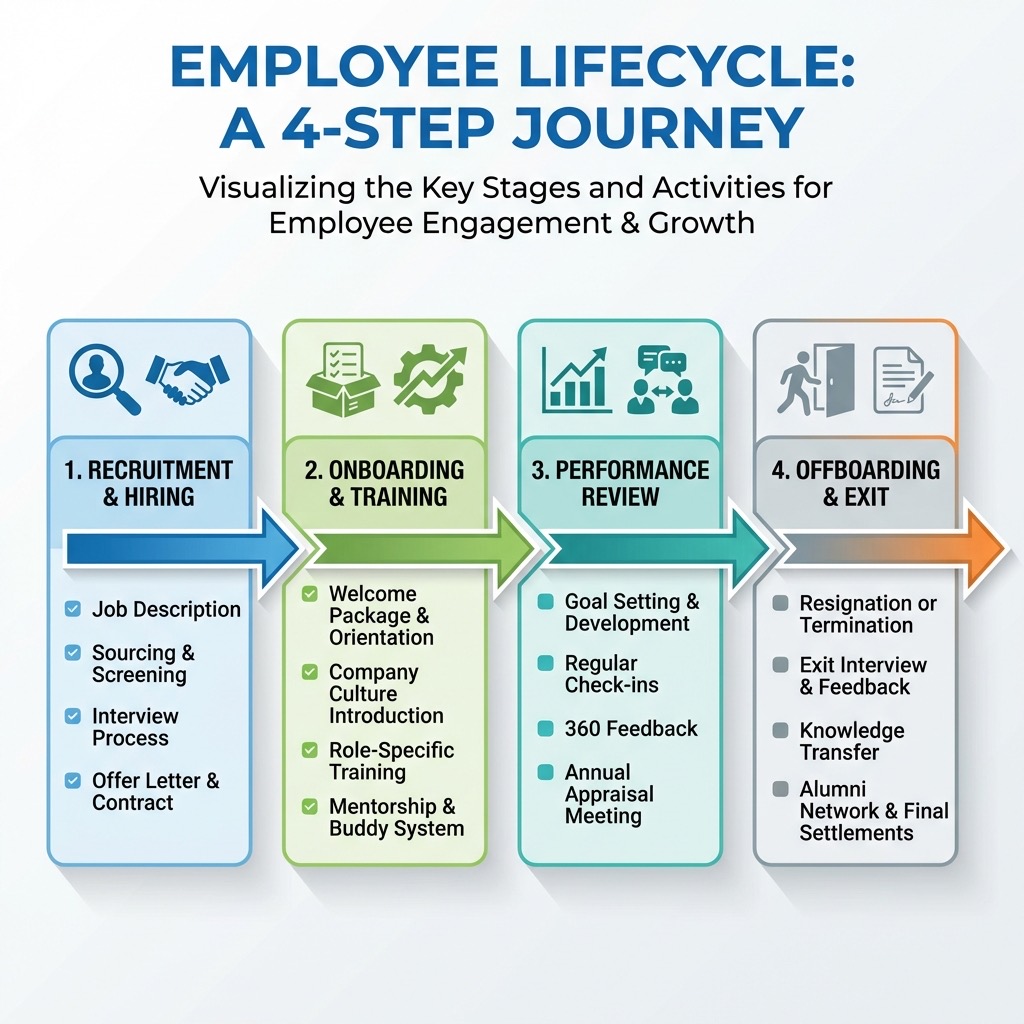
แต่ละ Skill ทำงานอิสระ คุณเลือกสร้างตัวไหนก่อนก็ได้ตาม pain point ที่มากที่สุด
Skill #1: Recruitment & Hiring Assistant
นี่คือ Skill ที่ HR teams ส่วนใหญ่จะได้ประโยชน์มากที่สุด เพราะงาน recruitment เป็น use case อันดับหนึ่งที่องค์กรนำ AI มาใช้ จากข้อมูลของ SHRM พบว่า 51% ขององค์กรใช้ AI สำหรับงาน recruiting โดยเฉพาะการเขียน job description (66%), คัดกรอง resume (44%), และจัดตาราง interview (32%)
โครงสร้าง Folder
hr-recruitment/
├── SKILL.md
├── references/
│   ├── job-description-guidelines.md
│   ├── interview-rubric.md
│   └── company-culture.md
└── assets/
    └── offer-letter-template.md
SKILL.md Template (Copy & Paste ได้เลย)
---
name: hr-recruitment
description: >
  HR Recruitment and Hiring Assistant. สร้าง job descriptions,
  คัดกรอง resume, เตรียมคำถามสัมภาษณ์, และร่าง offer letters
  ตาม company standards. Use when tasks involve: (1) Writing or
  improving job descriptions, (2) Screening resumes or candidate
  profiles, (3) Preparing interview questions and rubrics,
  (4) Drafting offer letters or rejection emails,
  (5) Any recruitment-related HR tasks.
---

# HR Recruitment & Hiring Assistant

## Core Instructions

When handling recruitment tasks, follow these guidelines:

### Job Description Creation

1. Read `references/job-description-guidelines.md` for company
   format and tone standards
2. Read `references/company-culture.md` for values and culture
   points to include
3. Structure every job description with these sections:
   - Role Overview (2-3 sentences, engaging tone)
   - Key Responsibilities (5-8 bullet points, action verbs)
   - Required Qualifications (must-haves only)
   - Preferred Qualifications (nice-to-haves)
   - What We Offer (benefits, culture, growth)
   - How to Apply
4. Use inclusive language — avoid gendered terms, unnecessary
   jargon, or requirements that create artificial barriers
5. Include salary range if provided by requester

### Resume Screening

1. Compare candidate qualifications against job requirements
2. Create a structured evaluation with:
   - Match Score (1-5) for each required qualification
   - Overall Fit Score with brief justification
   - Red Flags or concerns
   - Recommended next step: Advance / Hold / Pass
3. Focus on skills and experience, not demographics
4. Flag potential bias concerns proactively

### Interview Preparation

1. Read `references/interview-rubric.md` for evaluation criteria
2. Generate questions in three categories:
   - Technical/Role-specific (40%)
   - Behavioral/STAR format (40%)
   - Culture Fit & Motivation (20%)
3. Include scoring rubric for each question
4. Provide suggested follow-up probes

### Offer Letter Drafting

1. Use template from `assets/offer-letter-template.md`
2. Fill in all variable fields
3. Ensure compliance with local labor law requirements
4. Include standard terms: start date, compensation, benefits,
   reporting structure, probation period

### Rejection Communication

1. Always maintain respectful, encouraging tone
2. Thank candidate for their time and interest
3. Provide brief, constructive reason if appropriate
4. Encourage future applications if genuine
Reference File: Job Description Guidelines
สร้างไฟล์ references/job-description-guidelines.md:
# Job Description Guidelines

## Company Voice

- Professional but approachable
- Use "you" and "we" to create connection
- Avoid corporate jargon (e.g., "synergy", "leverage")
- Keep sentences short and scannable

## Required Sections

### Role Overview

- Start with impact: what this role achieves
- 2-3 sentences maximum
- Example: "As our [Role], you'll lead the effort to [impact].
  Working closely with [team], you'll [key activity] that
  directly affects [business outcome]."

### Responsibilities

- Start each bullet with strong action verb
- Focus on outcomes, not just tasks
- Group related items together
- 5-8 bullets maximum

### Qualifications

- Separate "Required" from "Preferred"
- Required: only true deal-breakers
- Avoid years-of-experience inflation
- Focus on skills over credentials where possible

## Inclusive Language Checklist

- [ ] No gendered pronouns (he/she → they/you)
- [ ] No unnecessary degree requirements
- [ ] No age-coded language (e.g., "digital native")
- [ ] Reasonable experience requirements
- [ ] Accessible language (avoid internal acronyms)
Reference File: Interview Rubric
สร้างไฟล์ references/interview-rubric.md:
# Interview Evaluation Rubric

## Scoring Scale

| Score | Label        | Description                       |
| ----- | ------------ | --------------------------------- |
| 5     | Exceptional  | Exceeds all expectations          |
| 4     | Strong       | Meets expectations with strengths |
| 3     | Adequate     | Meets basic expectations          |
| 2     | Below        | Gaps in key areas                 |
| 1     | Insufficient | Does not meet requirements        |

## Behavioral Question Framework (STAR)

Structure questions to elicit:

- **S**ituation: Context and background
- **T**ask: Specific responsibility or challenge
- **A**ction: What the candidate did
- **R**esult: Outcome and learnings

## Sample Questions by Category

### Problem Solving

- "Tell me about a time you had to solve a problem
  with incomplete information."
- Follow-up: "What would you do differently?"

### Collaboration

- "Describe a situation where you disagreed with a
  team member. How did you handle it?"
- Follow-up: "What was the outcome?"

### Leadership

- "Give an example of when you had to influence
  others without formal authority."
- Follow-up: "How did you measure success?"

### Adaptability

- "Tell me about a time when priorities shifted
  unexpectedly. How did you respond?"
- Follow-up: "What systems did you put in place?"

## Evaluation Template

After each interview, complete:

1. Technical Competency: \_\_\_ /5
2. Problem Solving: \_\_\_ /5
3. Communication: \_\_\_ /5
4. Culture Alignment: \_\_\_ /5
5. Overall Recommendation: Hire / No Hire / Hold
6. Key Strengths:
7. Areas of Concern:
8. Additional Notes:
Skill #2: Onboarding & Training Assistant
Onboarding เป็นจุดที่ส่งผลต่อ retention มากที่สุด จากข้อมูลหลายแหล่งพบว่าองค์กรที่มี structured onboarding program สามารถ เพิ่ม employee retention ได้ถึง 82% และ เพิ่ม productivity ของพนักงานใหม่ได้ 70%
ปัญหาคือ onboarding มักเป็นงานที่ “ทำซ้ำเหมือนเดิมทุกเดือน” แต่กินเวลา HR มากเพราะต้อง customize ให้แต่ละคน
โครงสร้าง Folder
hr-onboarding/
├── SKILL.md
├── references/
│   ├── onboarding-checklist.md
│   ├── company-handbook-summary.md
│   └── training-modules.md
└── assets/
    ├── welcome-email-template.md
    └── 30-60-90-plan-template.md
SKILL.md Template
---
name: hr-onboarding
description: >
  HR Onboarding and Training Assistant. สร้าง onboarding plans,
  welcome packages, training schedules, และ probation tracking
  สำหรับพนักงานใหม่. Use when tasks involve: (1) Creating
  onboarding plans or checklists, (2) Drafting welcome emails
  or packages, (3) Building 30-60-90 day plans, (4) Designing
  training schedules, (5) Tracking probation progress,
  (6) Creating buddy/mentor assignments.
---

# HR Onboarding & Training Assistant

## Core Instructions

### Onboarding Plan Creation

1. Read `references/onboarding-checklist.md` for standard
   process steps
2. Customize the plan based on:
   - Department and role level (Junior/Mid/Senior/Lead)
   - Employment type (Full-time/Contract/Intern)
   - Work arrangement (On-site/Remote/Hybrid)
3. Generate a complete onboarding timeline covering:
   - Pre-Day 1: IT setup, access requests, welcome package
   - Day 1: Orientation, introductions, workspace setup
   - Week 1: Team meetings, tool training, initial tasks
   - Month 1: Role-specific training, first deliverables
   - Month 2-3: Increased ownership, feedback sessions
4. Assign responsible persons for each item
5. Include check-in milestones

### Welcome Email/Package

1. Use template from `assets/welcome-email-template.md`
2. Personalize based on role and department
3. Include:
   - Warm welcome from hiring manager
   - First day logistics (time, location, what to bring)
   - Key contacts (HR buddy, direct manager, IT support)
   - Links to company handbook and policies
   - Company culture overview

### 30-60-90 Day Plan

1. Use template from `assets/30-60-90-plan-template.md`
2. Structure goals progressively:
   - **Days 1-30 (Learn)**: Understand role, team, tools,
     processes. Focus on absorbing knowledge.
   - **Days 31-60 (Contribute)**: Begin independent work,
     take on projects, build relationships.
   - **Days 61-90 (Own)**: Full ownership of responsibilities,
     propose improvements, deliver results.
3. Include specific, measurable goals for each phase
4. Define success criteria and evaluation methods

### Training Schedule

1. Read `references/training-modules.md` for available
   training resources
2. Create role-appropriate training path:
   - Mandatory training (compliance, security, policies)
   - Role-specific training (tools, processes, skills)
   - Optional development (soft skills, leadership)
3. Balance self-paced and instructor-led sessions
4. Include assessment checkpoints

### Probation Tracking

1. Generate probation review template at:
   - 1-month check-in (informal)
   - 2-month review (formal feedback)
   - 3-month evaluation (pass/extend/fail decision)
2. Include objective criteria from job description
3. Document both achievements and areas for improvement
4. Provide clear communication templates for all outcomes
Asset: Welcome Email Template
สร้างไฟล์ assets/welcome-email-template.md:
# Welcome Email Template

Subject: 🎉 Welcome to [Company Name], [First Name]!

---

สวัสดีครับ/ค่ะ [First Name],

ทีม [Company Name] ทุกคนยินดีต้อนรับคุณเข้าสู่ครอบครัวของเรา!
เราตื่นเต้นมากที่คุณจะมาร่วมทีม [Department] ในตำแหน่ง [Position]

## 📋 ข้อมูลสำหรับวันแรก

- **วันที่**: [Start Date]
- **เวลา**: [Start Time]
- **สถานที่**: [Location / Remote Link]
- **สิ่งที่ต้องเตรียม**: [บัตรประชาชน, สำเนาบัญชีธนาคาร, etc.]

## 👥 คนสำคัญที่คุณจะได้พบ

| บทบาท      | ชื่อ           | อีเมล   |
| ---------- | -------------- | ------- |
| ผู้จัดการ  | [Manager Name] | [Email] |
| HR Buddy   | [Buddy Name]   | [Email] |
| IT Support | [IT Name]      | [Email] |

## 📚 อ่านล่วงหน้า (ไม่บังคับ)

- [Company Handbook Link]
- [Team Wiki Link]
- [Product/Service Overview Link]

## 🎯 สัปดาห์แรกของคุณ

สัปดาห์แรกจะเน้นที่การทำความรู้จักทีม เรียนรู้เครื่องมือ
และทำความเข้าใจวัฒนธรรมองค์กร ไม่ต้องกังวลเรื่องงาน delivery
เรามี onboarding plan ที่จะพาคุณเรียนรู้ทุกอย่างอย่างเป็นขั้นตอน

หากมีคำถามอะไร สามารถติดต่อ [HR Contact] ได้ตลอดครับ/ค่ะ

ยินดีต้อนรับอีกครั้ง! 🙌

[Sender Name]
[Title]
[Company Name]
Asset: 30-60-90 Day Plan Template
สร้างไฟล์ assets/30-60-90-plan-template.md:
# 30-60-90 Day Plan

**พนักงาน**: [Name]
**ตำแหน่ง**: [Position]
**แผนก**: [Department]
**วันเริ่มงาน**: [Start Date]
**ผู้จัดการ**: [Manager Name]

---

## Phase 1: Learn (วันที่ 1-30)

**เป้าหมายหลัก**: เข้าใจบทบาท ทีม เครื่องมือ และกระบวนการ

### สิ่งที่ต้องทำ

- [ ] เข้าร่วม orientation program ทั้งหมด
- [ ] ประชุมแนะนำตัวกับสมาชิกทีมทุกคน
- [ ] เรียนรู้เครื่องมือหลักที่ใช้ในงาน: [Tool 1], [Tool 2]
- [ ] อ่าน documentation สำคัญ: [Doc 1], [Doc 2]
- [ ] เข้าใจ workflow หลักของทีม
- [ ] เข้าร่วมประชุมทีมประจำสัปดาห์

### ตัวชี้วัดความสำเร็จ

- [ ] สามารถอธิบายบทบาทและความรับผิดชอบหลักได้
- [ ] ใช้เครื่องมือหลักได้อย่างคล่องแคล่ว
- [ ] เข้าใจ workflow และ stakeholders หลัก

### Check-in: สัปดาห์ที่ 4

- วันที่: \***\*\_\_\_\*\***
- ผลการประเมิน: \***\*\_\_\_\*\***
- หมายเหตุ: \***\*\_\_\_\*\***

---

## Phase 2: Contribute (วันที่ 31-60)

**เป้าหมายหลัก**: เริ่มทำงานอิสระและส่งมอบผลงาน

### สิ่งที่ต้องทำ

- [ ] รับผิดชอบ project/task แรก: [Project Name]
- [ ] สร้างความสัมพันธ์กับ cross-functional teams
- [ ] เสนอ improvement ideas อย่างน้อย 1 เรื่อง
- [ ] เข้าร่วม training เพิ่มเติม: [Training Topic]
- [ ] ขอ feedback จากเพื่อนร่วมทีม

### ตัวชี้วัดความสำเร็จ

- [ ] ส่งมอบ project/task แรกสำเร็จ
- [ ] ทำงานอิสระได้โดยไม่ต้อง guide ตลอด
- [ ] ได้รับ positive feedback จากทีม

### Check-in: สัปดาห์ที่ 8

- วันที่: \***\*\_\_\_\*\***
- ผลการประเมิน: \***\*\_\_\_\*\***
- หมายเหตุ: \***\*\_\_\_\*\***

---

## Phase 3: Own (วันที่ 61-90)

**เป้าหมายหลัก**: รับผิดชอบเต็มที่และสร้าง impact

### สิ่งที่ต้องทำ

- [ ] เป็นเจ้าของ area of responsibility อย่างเต็มตัว
- [ ] นำเสนอ improvement project ที่ริเริ่มเอง
- [ ] Mentor หรือช่วยเหลือสมาชิกในทีม
- [ ] กำหนด OKR/Goals สำหรับ quarter ถัดไป
- [ ] เข้าร่วม cross-functional initiative

### ตัวชี้วัดความสำเร็จ

- [ ] ทำงานได้เต็ม capacity ตาม job description
- [ ] มี measurable impact ต่อทีม/องค์กร
- [ ] ได้รับ positive evaluation จากผู้จัดการ

### Probation Review: สัปดาห์ที่ 12

- วันที่: \***\*\_\_\_\*\***
- ผลการประเมิน: ผ่าน / ขยายเวลา / ไม่ผ่าน
- จุดแข็ง: \***\*\_\_\_\*\***
- จุดที่ต้องพัฒนา: \***\*\_\_\_\*\***
- แผนพัฒนา: \***\*\_\_\_\*\***

---

**ลงชื่อพนักงาน**: \***\*\_\_\_\*\*** วันที่: \***\*\_\_\_\*\***

**ลงชื่อผู้จัดการ**: \***\*\_\_\_\*\*** วันที่: \***\*\_\_\_\*\***
Skill #3: Performance Review Assistant
Performance review เป็นงานที่ HR และ managers เกลียดที่สุดแต่หลีกเลี่ยงไม่ได้ ทุก cycle ต้องเขียน review, ให้ feedback, ทำ calibration ข้ามทีม — งานที่กินเวลาหลายสัปดาห์
Claude Skill นี้จะช่วยให้ทั้งกระบวนการเร็วขึ้น consistent ขึ้น และ fair ขึ้น
โครงสร้าง Folder
hr-performance/
├── SKILL.md
├── references/
│   ├── competency-framework.md
│   ├── rating-scale.md
│   └── pip-guidelines.md
└── assets/
    ├── self-assessment-template.md
    ├── manager-review-template.md
    └── pip-template.md
SKILL.md Template
---
name: hr-performance
description: >
  HR Performance Review Assistant. สร้าง performance reviews,
  360-degree feedback, self-assessments, promotion cases, และ
  Performance Improvement Plans (PIPs). Use when tasks involve:
  (1) Writing performance review summaries, (2) Generating
  self-assessment templates, (3) Creating 360 feedback forms,
  (4) Drafting PIPs, (5) Building promotion business cases,
  (6) Calibrating ratings across teams.
---

# HR Performance Review Assistant

## Core Instructions

### Performance Review Writing

1. Read `references/competency-framework.md` for evaluation
   criteria specific to each role level
2. Read `references/rating-scale.md` for standardized ratings
3. Structure every review with:
   - **Summary**: 2-3 sentence overall assessment
   - **Key Achievements**: Specific accomplishments with
     measurable impact (use data where available)
   - **Competency Ratings**: Score each competency area
   - **Strengths**: Top 2-3 areas of excellence
   - **Growth Areas**: Top 2-3 areas for development
   - **Goals for Next Period**: SMART goals
   - **Overall Rating**: Based on rating scale
4. Use objective, evidence-based language
5. Avoid recency bias — consider the entire review period
6. Balance positive and constructive feedback (aim for
   60/40 ratio of strengths to growth areas)

### Self-Assessment Generation

1. Use template from `assets/self-assessment-template.md`
2. Customize questions based on role and level
3. Include prompts that encourage specific examples
4. Add reflection questions about career development

### 360-Degree Feedback

1. Generate role-appropriate feedback questions
2. Categories:
   - Technical Skills & Job Knowledge
   - Communication & Collaboration
   - Leadership & Influence
   - Problem Solving & Innovation
   - Alignment with Company Values
3. Use a mix of rating scales and open-ended questions
4. Include instructions for constructive feedback

### Performance Improvement Plan (PIP)

1. Read `references/pip-guidelines.md` for legal
   considerations and best practices
2. Use template from `assets/pip-template.md`
3. Ensure PIP includes:
   - Clear description of performance gaps
   - Specific, measurable improvement targets
   - Resources and support provided
   - Timeline with checkpoints (typically 30-60-90 days)
   - Consequences of not meeting targets
   - Manager commitment to support
4. Use supportive but direct language
5. Focus on behaviors and outcomes, not personality

### Promotion Business Case

1. Structure the case with:
   - Current role and tenure
   - Evidence of consistent above-level performance
   - Specific achievements and impact metrics
   - Readiness indicators for next level
   - Stakeholder endorsements
   - Proposed new role, title, and compensation
2. Use data from past reviews and 360 feedback
3. Align with competency framework for target level
Reference File: Competency Framework
สร้างไฟล์ references/competency-framework.md:
# Competency Framework

## Level Definitions

### Individual Contributor (IC)

| Level | Title  | Scope              | Expectations              |
| ----- | ------ | ------------------ | ------------------------- |
| IC1   | Junior | Task-level         | Learns, follows guidance  |
| IC2   | Mid    | Project-level      | Works independently       |
| IC3   | Senior | Cross-project      | Mentors, drives outcomes  |
| IC4   | Staff  | Organization-level | Sets direction, innovates |

### Manager (M)

| Level | Title     | Scope          | Expectations             |
| ----- | --------- | -------------- | ------------------------ |
| M1    | Team Lead | Single team    | Manages 3-8 reports      |
| M2    | Manager   | Multiple teams | Manages managers         |
| M3    | Director  | Department     | Sets department strategy |
| M4    | VP        | Multiple depts | Sets org strategy        |

## Core Competencies

### 1. Execution & Delivery

- Delivers quality work on time
- Manages priorities effectively
- Follows through on commitments

### 2. Communication & Collaboration

- Communicates clearly and effectively
- Works well across teams
- Builds productive relationships

### 3. Problem Solving & Innovation

- Identifies root causes
- Proposes creative solutions
- Learns from failures

### 4. Leadership & Growth

- Mentors and develops others (Senior+)
- Drives team/org improvements
- Demonstrates company values

### 5. Domain Expertise

- Maintains deep knowledge in area
- Stays current with industry trends
- Shares knowledge with others
Reference File: Rating Scale
สร้างไฟล์ references/rating-scale.md:
# Performance Rating Scale

## Overall Rating

| Rating | Label                | Description                            |
| ------ | -------------------- | -------------------------------------- |
| 5      | Exceptional          | Consistently exceeds expectations;     |
|        |                      | top 5% performer; significant impact   |
| 4      | Exceeds Expectations | Frequently exceeds expectations;       |
|        |                      | strong contributor; notable impact     |
| 3      | Meets Expectations   | Consistently meets expectations;       |
|        |                      | solid performer; reliable delivery     |
| 2      | Needs Improvement    | Occasionally falls below expectations; |
|        |                      | requires additional support            |
| 1      | Unsatisfactory       | Consistently below expectations;       |
|        |                      | immediate improvement needed           |

## Distribution Guidelines (Calibration)

- Rating 5: ~5-10% of team
- Rating 4: ~20-25% of team
- Rating 3: ~50-60% of team
- Rating 2: ~10-15% of team
- Rating 1: ~0-5% of team

## Important Notes

- Ratings should reflect the ENTIRE review period
- Use specific examples for every rating
- Compare against role expectations, not peers
- Consider both WHAT was achieved and HOW
Asset: PIP Template
สร้างไฟล์ assets/pip-template.md:
# Performance Improvement Plan

**เอกสาร: ลับ — เฉพาะผู้เกี่ยวข้องเท่านั้น**

---

**พนักงาน**: [Name]
**ตำแหน่ง**: [Position]
**แผนก**: [Department]
**ผู้จัดการ**: [Manager Name]
**HR Business Partner**: [HRBP Name]
**วันที่เริ่มต้น PIP**: [Date]
**วันที่สิ้นสุด PIP**: [Date] (ระยะเวลา: [30/60/90] วัน)

---

## 1. สรุปปัญหาด้านผลการปฏิบัติงาน

### ด้านที่ต้องปรับปรุง

| #   | ปัญหาที่พบ  | ตัวอย่างเหตุการณ์       | ผลกระทบ             |
| --- | ----------- | ----------------------- | ------------------- |
| 1   | [ระบุปัญหา] | [ระบุตัวอย่าง + วันที่] | [ผลกระทบต่อทีม/งาน] |
| 2   | [ระบุปัญหา] | [ระบุตัวอย่าง + วันที่] | [ผลกระทบต่อทีม/งาน] |
| 3   | [ระบุปัญหา] | [ระบุตัวอย่าง + วันที่] | [ผลกระทบต่อทีม/งาน] |

### การดำเนินการก่อนหน้า

- [ระบุ verbal warnings, coaching, feedback ที่เคยให้]

---

## 2. เป้าหมายที่ต้องบรรลุ

| #   | เป้าหมาย (SMART)           | ตัวชี้วัด    | กำหนดเวลา |
| --- | -------------------------- | ------------ | --------- |
| 1   | [เป้าหมายที่ชัดเจน วัดได้] | [KPI/Metric] | [Date]    |
| 2   | [เป้าหมายที่ชัดเจน วัดได้] | [KPI/Metric] | [Date]    |
| 3   | [เป้าหมายที่ชัดเจน วัดได้] | [KPI/Metric] | [Date]    |

---

## 3. แผนสนับสนุนจากองค์กร

| การสนับสนุน | รายละเอียด                    | ผู้รับผิดชอบ |
| ----------- | ----------------------------- | ------------ |
| Coaching    | ประชุม 1:1 รายสัปดาห์         | [Manager]    |
| Training    | [ระบุ training ที่จัดให้]     | [HR/Manager] |
| Resources   | [เครื่องมือ/อุปกรณ์เพิ่มเติม] | [Department] |
| Mentoring   | [จับคู่ mentor ถ้ามี]         | [HR]         |

---

## 4. ตารางติดตามความคืบหน้า

### Check-in ครั้งที่ 1 (สัปดาห์ที่ 2)

- วันที่: \***\*\_\_\_\*\***
- ความคืบหน้า: \***\*\_\_\_\*\***
- ปัญหา/อุปสรรค: \***\*\_\_\_\*\***
- แผนต่อไป: \***\*\_\_\_\*\***

### Check-in ครั้งที่ 2 (สัปดาห์ที่ 4)

- วันที่: \***\*\_\_\_\*\***
- ความคืบหน้า: \***\*\_\_\_\*\***
- ปัญหา/อุปสรรค: \***\*\_\_\_\*\***
- แผนต่อไป: \***\*\_\_\_\*\***

### Final Review (สิ้นสุด PIP)

- วันที่: \***\*\_\_\_\*\***
- ผลลัพธ์: ผ่าน / ขยายเวลา / ไม่ผ่าน
- หมายเหตุ: \***\*\_\_\_\*\***

---

## 5. ผลลัพธ์ที่เป็นไปได้

- **ผ่าน PIP**: กลับสู่การทำงานปกติ มีการติดตามต่อ 90 วัน
- **ขยายเวลา**: ต่ออายุ PIP อีก [ระยะเวลา] หาก
  มีความคืบหน้าบางส่วน
- **ไม่ผ่าน PIP**: ดำเนินการตามนโยบายบริษัท
  ซึ่งอาจรวมถึงการเปลี่ยนตำแหน่งหรือเลิกจ้าง

---

**ลงชื่อพนักงาน**: \***\*\_\_\_\*\*** วันที่: \***\*\_\_\_\*\***
(การลงชื่อไม่ได้หมายถึงการเห็นด้วย แต่เป็นการรับทราบเท่านั้น)

**ลงชื่อผู้จัดการ**: \***\*\_\_\_\*\*** วันที่: \***\*\_\_\_\*\***

**ลงชื่อ HRBP**: \***\*\_\_\_\*\*** วันที่: \***\*\_\_\_\*\***
Skill #4: Offboarding & Exit Assistant
ทุกคนมักจะโฟกัสที่ recruitment และ onboarding แต่ offboarding ที่ดีสำคัญไม่แพ้กัน เพราะมันส่งผลต่อ employer brand, knowledge retention, และ alumni network
โครงสร้าง Folder
hr-offboarding/
├── SKILL.md
├── references/
│   └── offboarding-policy.md
└── assets/
    ├── exit-interview-template.md
    ├── knowledge-transfer-template.md
    └── offboarding-checklist.md
SKILL.md Template
---
name: hr-offboarding
description: >
  HR Offboarding and Exit Assistant. จัดการ offboarding process,
  exit interviews, knowledge transfer, และเอกสารที่เกี่ยวข้อง.
  Use when tasks involve: (1) Creating offboarding checklists,
  (2) Preparing exit interview questions, (3) Building knowledge
  transfer plans, (4) Drafting farewell communications,
  (5) Generating work certificates or reference letters,
  (6) Any separation-related HR tasks.
---

# HR Offboarding & Exit Assistant

## Core Instructions

### Offboarding Checklist

1. Use checklist from `assets/offboarding-checklist.md`
2. Customize based on:
   - Reason for departure (resign/terminate/retire/contract end)
   - Seniority level and access privileges
   - Department-specific requirements
3. Ensure all compliance steps are included:
   - IT access revocation timeline
   - Company property return
   - Final pay and benefits settlement
   - Non-compete/NDA reminders
   - Benefits continuation (COBRA equivalent)

### Exit Interview

1. Use template from `assets/exit-interview-template.md`
2. Customize questions based on:
   - Department and role
   - Reason for leaving
   - Tenure length
3. Focus areas:
   - Job satisfaction factors
   - Management effectiveness
   - Growth opportunities
   - Work environment and culture
   - Reasons for departure
   - Suggestions for improvement
4. Maintain neutral, non-defensive tone
5. Emphasize confidentiality of responses

### Knowledge Transfer Plan

1. Use template from `assets/knowledge-transfer-template.md`
2. Structure transfer plan with:
   - Critical processes and workflows
   - Key contacts and stakeholder relationships
   - Ongoing projects and their status
   - Passwords, access, and documentation locations
   - Institutional knowledge and historical context
3. Set timeline: ideally 2-4 weeks before last day
4. Assign specific recipients for each knowledge area

### Farewell Communication

1. Draft appropriate communications:
   - Internal announcement (team/company)
   - Client/external stakeholder notification
   - Farewell message from departing employee (if requested)
2. Maintain positive, professional tone
3. Include transition plan and new contacts
4. Respect privacy — share only what employee approves

### Work Certificate / Reference Letter

1. Include: employee name, dates, position, key responsibilities
2. For positive references: highlight achievements and strengths
3. Maintain factual accuracy
4. Follow local labor law requirements for content
Asset: Exit Interview Template
สร้างไฟล์ assets/exit-interview-template.md:
# Exit Interview Template

**พนักงาน**: [Name]
**ตำแหน่ง**: [Position]
**แผนก**: [Department]
**วันเริ่มงาน**: [Start Date]
**วันสุดท้าย**: [Last Day]
**ระยะเวลาทำงาน**: [Duration]
**ผู้สัมภาษณ์**: [HR Name]
**วันที่สัมภาษณ์**: [Date]

---

**คำชี้แจง**: Exit Interview นี้เป็นความลับ ข้อมูลจะถูกใช้
เพื่อปรับปรุงองค์กรเท่านั้น จะไม่มีผลต่อ reference letter
หรือสิทธิประโยชน์ใดๆ ของคุณ

---

## ส่วนที่ 1: เหตุผลในการลาออก

1. อะไรเป็นสาเหตุหลักที่ตัดสินใจลาออก?

   > ***

2. มีเหตุการณ์เฉพาะเจาะจงที่ทำให้ตัดสินใจหรือไม่?

   > ***

3. มีสิ่งใดที่บริษัทสามารถทำได้เพื่อให้คุณอยู่ต่อ?
   > ***

## ส่วนที่ 2: ความพึงพอใจในงาน

| ด้าน                   | คะแนน (1-5) | ความคิดเห็น        |
| ---------------------- | :---------: | ------------------ |
| ลักษณะงาน              |   \_\_\_    | \***\*\_\_\_\*\*** |
| Work-life balance      |   \_\_\_    | \***\*\_\_\_\*\*** |
| เงินเดือนและสวัสดิการ  |   \_\_\_    | \***\*\_\_\_\*\*** |
| โอกาสเติบโต            |   \_\_\_    | \***\*\_\_\_\*\*** |
| ความสัมพันธ์กับหัวหน้า |   \_\_\_    | \***\*\_\_\_\*\*** |
| ความสัมพันธ์กับทีม     |   \_\_\_    | \***\*\_\_\_\*\*** |
| วัฒนธรรมองค์กร         |   \_\_\_    | \***\*\_\_\_\*\*** |
| เครื่องมือและทรัพยากร  |   \_\_\_    | \***\*\_\_\_\*\*** |

## ส่วนที่ 3: Management & Leadership

4. หัวหน้างานให้ feedback ที่เป็นประโยชน์สม่ำเสมอหรือไม่?

   > ***

5. คุณรู้สึกว่าความคิดเห็นของคุณถูกรับฟังหรือไม่?

   > ***

6. มีข้อเสนอแนะอะไรสำหรับ management?
   > ***

## ส่วนที่ 4: สิ่งที่ดีและสิ่งที่ควรปรับปรุง

7. สิ่งที่ดีที่สุด 3 อย่างเกี่ยวกับการทำงานที่นี่?

   > 1. ***
   > 2. ***
   > 3. ***

8. สิ่งที่ควรปรับปรุงมากที่สุด 3 อย่าง?

   > 1. ***
   > 2. ***
   > 3. ***

9. คุณจะแนะนำบริษัทนี้ให้คนอื่นมาทำงานหรือไม่? (eNPS)
   > คะแนน: **\_ /10
   > เหตุผล: \*\***\_**\*\***

## ส่วนที่ 5: สรุป

10. มีอะไรเพิ่มเติมที่อยากแบ่งปันหรือไม่?
    > ***

---

**สรุปโดย HR**:

- ประเด็นหลักที่ได้: \***\*\_\_\_\*\***
- Action items: \***\*\_\_\_\*\***
- ความเร่งด่วน: สูง / กลาง / ต่ำ
วิธี Install และใช้งาน Skills
เมื่อสร้าง template เสร็จแล้ว มาดูวิธีนำไปใช้จริง
วิธีที่ 1: ใช้ผ่าน Claude.ai (ง่ายที่สุด)
- ไปที่ Settings > Features บน claude.ai
- เปิด Code Execution (จำเป็นต้องเปิดก่อน)
- ไปที่ Custom Skills
- อัปโหลด folder ของ Skill ที่สร้าง (zip file)
- เริ่มใช้งานได้เลย — Claude จะ detect อัตโนมัติ
วิธีที่ 2: ใช้ผ่าน Claude Code
# สร้าง folder structure
mkdir -p ~/.claude/skills/hr-recruitment/references
mkdir -p ~/.claude/skills/hr-recruitment/assets

# copy ไฟล์ SKILL.md และ references เข้าไป
# แล้ว Claude Code จะ detect อัตโนมัติ
หรือใช้ plugin จาก marketplace:
# Install จาก marketplace (ถ้ามี)
/plugin install hr-skills@your-org
วิธีที่ 3: ใช้ผ่าน API
import anthropic
from anthropic.lib import files_from_dir

client = anthropic.Anthropic()

# Upload custom skill
hr_skill = client.beta.skills.create(
    display_title="HR Recruitment Assistant",
    files=files_from_dir("/path/to/hr-recruitment"),
    betas=["skills-2025-10-02"]
)

# Use the skill
response = client.beta.messages.create(
    model="claude-sonnet-4-5-20250929",
    max_tokens=4096,
    betas=["code-execution-2025-08-25", "skills-2025-10-02"],
    container={
        "skills": [
            {
                "type": "custom",
                "skill_id": hr_skill.id,
                "version": "latest"
            }
        ]
    },
    messages=[{
        "role": "user",
        "content": "สร้าง job description สำหรับตำแหน่ง Senior Software Engineer"
    }],
    tools=[{
        "type": "code_execution_20250825",
        "name": "code_execution"
    }]
)
Customization Guide: ปรับ Skill ให้เข้ากับองค์กร
Template ที่ให้ไว้ข้างบนเป็น “starting point” ที่ดี แต่จะได้ประโยชน์สูงสุดเมื่อคุณ customize ให้ตรงกับ context ขององค์กร นี่คือสิ่งที่ควรปรับ:
1. เพิ่ม Company-Specific References
สร้างไฟล์ references/company-culture.md ที่อธิบายวัฒนธรรมองค์กรคุณ:
# Company Culture & Values

## Core Values

1. [Value 1] — [คำอธิบายสั้นๆ]
2. [Value 2] — [คำอธิบายสั้นๆ]
3. [Value 3] — [คำอธิบายสั้นๆ]

## Tone of Voice

- [ภาษาที่ใช้ในองค์กร formal/casual]
- [ศัพท์เฉพาะที่ใช้บ่อย]
- [สิ่งที่ไม่ควรพูด]

## Benefits & Perks (สำหรับ job descriptions)

- [Benefit 1]
- [Benefit 2]
- [Benefit 3]
2. ปรับ Rating Scale ตามที่ใช้จริง
ถ้าองค์กรใช้ rating scale 4 ระดับแทน 5 ก็ปรับใน references/rating-scale.md ได้เลย
3. เพิ่ม Legal Requirements
ถ้าองค์กรอยู่ในไทย อาจเพิ่ม reference เกี่ยวกับ พ.ร.บ.คุ้มครองแรงงาน หรือข้อกำหนดเฉพาะ เช่น:
# Legal Requirements (Thailand)

## การเลิกจ้าง

- ต้องแจ้งล่วงหน้าอย่างน้อย 1 งวดการจ่ายเงินเดือน
- ค่าชดเชยตามอายุงาน (พ.ร.บ.คุ้มครองแรงงาน มาตรา 118)

## ทดลองงาน

- ระยะเวลาทดลองงานมาตรฐาน 120 วัน
- ต้องแจ้งผลก่อนครบกำหนด

## การจัดเก็บข้อมูลส่วนบุคคล

- ปฏิบัติตาม พ.ร.บ.คุ้มครองข้อมูลส่วนบุคคล (PDPA)
4. รวม Skills เข้าด้วยกัน
Claude สามารถใช้หลาย Skills พร้อมกันได้ (สูงสุด 8 Skills ต่อ request) เช่น ใช้ HR Recruitment Skill ร่วมกับ XLSX Skill เพื่อสร้าง candidate tracking spreadsheet:
container={
    "skills": [
        {"type": "custom", "skill_id": hr_recruitment_id, "version": "latest"},
        {"type": "anthropic", "skill_id": "xlsx", "version": "latest"}
    ]
}
Real-World Use Cases: ตัวอย่างการใช้งานจริง
เมื่อ install Skills เรียบร้อยแล้ว นี่คือตัวอย่างที่คุณสามารถสั่ง Claude ได้ทันที:
📝 Recruitment
"สร้าง job description สำหรับตำแหน่ง Data Analyst
ระดับ Mid-level แผนก Marketing ที่ต้องมี SQL, Python,
และประสบการณ์ 3 ปีขึ้นไป"
"คัดกรอง resume 5 ฉบับนี้สำหรับตำแหน่ง Product Manager
โดยให้คะแนนตาม criteria ในหัวข้อ required qualifications"
"เตรียมชุดคำถามสัมภาษณ์สำหรับ Senior UX Designer
20 ข้อ แบ่งเป็น technical, behavioral, และ culture fit"
🎯 Onboarding
"สร้าง onboarding plan สำหรับ Software Engineer ระดับ Senior
ที่จะเริ่มงาน remote ในเดือนหน้า"
"เขียน welcome email ให้พนักงานใหม่ชื่อ สมชาย
ตำแหน่ง Marketing Manager แผนก Digital Marketing
เริ่มงานวันจันทร์ที่ 3 กุมภาพันธ์"
📊 Performance Review
"ช่วยเขียน performance review สำหรับ developer ระดับ IC3
ที่ deliver โปรเจคหลักสำเร็จตาม deadline ทุกรอบ
แต่ communication กับ stakeholders ยังต้องปรับปรุง"
"สร้าง PIP สำหรับพนักงานที่มีปัญหาเรื่อง attendance
และ missed deadlines ในช่วง 3 เดือนที่ผ่านมา"
👋 Offboarding
"สร้าง offboarding checklist สำหรับ Engineering Manager
ที่ resign โดยมี 30 วันก่อนวันสุดท้าย"
"เตรียมคำถาม exit interview สำหรับพนักงาน
ที่ทำงานมา 5 ปี ลาออกเพื่อไปทำงานที่อื่น"
HR Skills ROI: ผลตอบแทนที่คาดหวัง
จากข้อมูลของ Harvard Business School ที่พบว่า AI ช่วยให้พนักงานทำงานเสร็จ เร็วขึ้น 25% ด้วยคุณภาพที่สูงขึ้น 40% ลองมาประเมิน ROI เฉพาะงาน HR กัน:
| งาน HR | เวลาเดิม | เวลาหลังใช้ Skill | ลดลง |
|---|---|---|---|
| เขียน Job Description | 2 ชม. | 15 นาที | 87% |
| คัดกรอง Resume (20 ใบ) | 4 ชม. | 30 นาที | 87% |
| เตรียมคำถาม Interview | 1.5 ชม. | 10 นาที | 89% |
| สร้าง Onboarding Plan | 3 ชม. | 20 นาที | 89% |
| เขียน Performance Review | 2 ชม./คน | 20 นาที/คน | 83% |
| สร้าง PIP Document | 4 ชม. | 30 นาที | 87% |
| Exit Interview + Report | 3 ชม. | 30 นาที | 83% |
สมมติ HR team มีพนักงาน 3 คน:
- ถ้าแต่ละคนประหยัดเวลาได้ 10 ชม./สัปดาห์ จากการใช้ Skills
- = 30 ชม./สัปดาห์ หรือ 120 ชม./เดือน ที่ปลดปล่อยออกมา
- เวลาเหล่านี้สามารถใช้ไปกับงาน strategic เช่น talent development, culture building, employee engagement
ข้อควรระวังและ Best Practices
✅ DOs
- เริ่มจาก Skill เดียว — อย่าพยายามทำทุกอย่างพร้อมกัน เลือกงานที่เป็น pain point ที่สุดก่อน
- Customize references ให้ตรงกับองค์กร — ยิ่ง Claude รู้ context มากเท่าไหร่ output ยิ่งดีเท่านั้น
- Review output ทุกครั้ง — Claude ช่วย draft ได้ดีเยี่ยม แต่ human judgment ยังจำเป็นเสมอ โดยเฉพาะเรื่องที่ sensitive เช่น PIP หรือ termination
- Iterate และปรับปรุง — เก็บ feedback จากทีม แล้วปรับ Skill ให้ดีขึ้นเรื่อยๆ
- แบ่งปันกับทีม — ถ้าใช้ Claude Code ให้เก็บ Skills ไว้ใน Git repo เพื่อให้ทุกคนใช้เหมือนกัน
❌ DON’Ts
- อย่าใช้ AI ตัดสินใจแทนคน — AI ช่วย screen และ recommend แต่การ hire/fire ควรเป็น human decision เสมอ
- อย่าใส่ข้อมูลส่วนบุคคลจริงใน SKILL.md — เก็บแค่ template และ guidelines ข้อมูลพนักงานจริงให้ input ตอนใช้งาน
- อย่าลืมเรื่อง bias — ตรวจสอบ output ว่าไม่มี bias ด้านเพศ อายุ เชื้อชาติ ในทุกเอกสารที่สร้าง
- อย่าข้ามขั้นตอน legal review — เอกสารที่เกี่ยวกับกฎหมายแรงงาน (PIP, termination) ต้องให้ legal team review ก่อนใช้จริง
- อย่าเชื่อ output 100% — Cross-check ข้อมูลสำคัญ เช่น ตัวเลขเงินเดือน สวัสดิการ เงื่อนไขสัญญา
Quick Start: เริ่มใน 15 นาที
ถ้าอยากเริ่มใช้งานเร็วที่สุด ทำตามนี้:
ขั้นที่ 1 (5 นาที): เลือก Skill 1 ตัวที่ตรงกับ pain point มากที่สุด
ขั้นที่ 2 (5 นาที): Copy template จากบทความนี้ สร้าง folder structure
ขั้นที่ 3 (5 นาที): ปรับ references ให้ตรงกับองค์กร (เพิ่ม company values, rating scale, policies)
ขั้นที่ 4: Upload เข้า Claude.ai หรือ Claude Code แล้วเริ่มใช้งาน!
สรุป
Claude Skills เปลี่ยน HR จาก “ทำงานซ้ำซากทุกวัน” เป็น “มี AI assistant ที่เข้าใจ workflow ขององค์กร” ด้วย framework 4 Skills ที่ครอบคลุม Employee Lifecycle ทั้งหมด ตั้งแต่ Recruitment, Onboarding, Performance Review ไปจนถึง Offboarding
สิ่งที่สำคัญที่สุดคือ อย่ารอให้ perfect แล้วค่อยเริ่ม — เลือก Skill ตัวเดียวที่แก้ปัญหาเร่งด่วนที่สุด customize ให้ตรงกับองค์กร แล้วเริ่มใช้ เก็บ feedback จากทีม แล้วค่อยๆ ขยายไปทีละ Skill
HR ที่ดีไม่ใช่แค่ทำงาน admin ให้เสร็จ แต่คือการสร้าง environment ที่คนเก่งอยากอยู่ และ Claude Skills ช่วยปลดปล่อยเวลาให้ HR ทำเรื่องสำคัญเหล่านั้นได้
ลองเริ่มกันวันนี้ แล้วมาแชร์กันได้ครับว่า Skill ไหนช่วยคุณได้มากที่สุด! 🚀